

AI features often fail in production despite high-performing models during testing. Why? The challenges aren’t with the models themselves but with the systems, processes, and environments around them. Here’s a quick summary of the key reasons and solutions:
Why AI Fails in Production
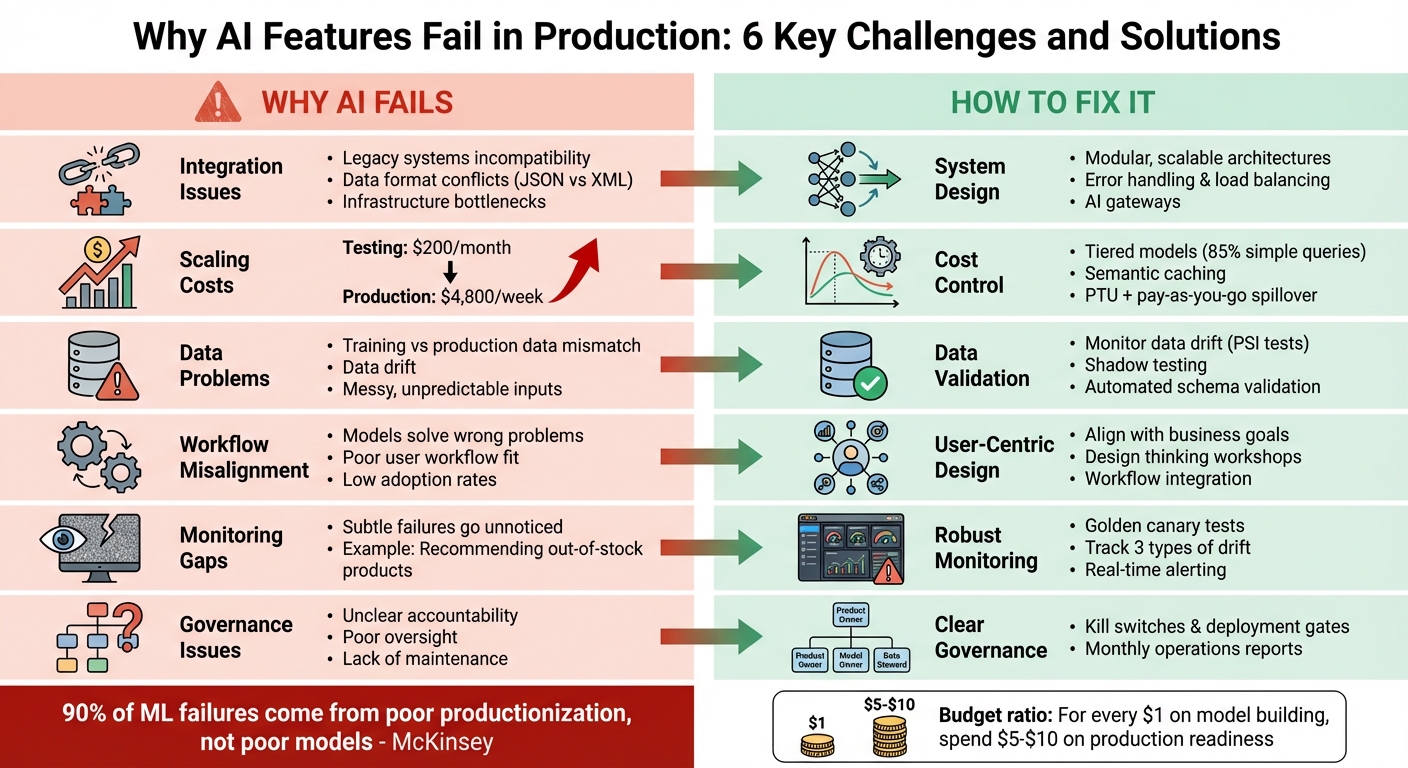
- Integration Issues: Legacy systems, incompatible data formats (e.g., JSON vs. XML), and infrastructure bottlenecks derail success.
- Scaling Costs: Testing costs might be $200/month, but production can jump to $4,800/week without proper cost planning.
- Data Problems: Training data often doesn’t match messy, unpredictable production data, leading to "data drift."
- Workflow Misalignment: Models solve the wrong problems or don’t fit into user workflows, leading to low adoption.
- Monitoring Gaps: Subtle failures, like recommending out-of-stock products, often go unnoticed without robust monitoring.
- Governance and Ownership: Lack of clear accountability for AI features results in poor oversight and maintenance.
How to Fix It
- System Design: Build modular, scalable architectures with error handling, load balancing, and AI gateways.
- Cost Control: Use tiered models and caching to manage expenses efficiently.
- Data Validation: Monitor for data drift and mismatches using tools like PSI or shadow testing.
- User-Centric Design: Align AI features with business goals and user workflows to ensure adoption.
- Governance: Assign clear ownership roles (e.g., Product Owner, Model Owner) and establish safeguards like "kill switches" and deployment gates.
Bottom Line: AI success in production isn’t just about good models – it’s about integrating them into resilient, scalable systems with proper monitoring, governance, and alignment with business needs.
Why AI Features Fail in Production: 6 Key Challenges and Solutions
The Gap Between Model Performance and Production Outcomes
Model Performance vs. Production Success
An AI model might shine in development, boasting impressive technical metrics like accuracy, F1 scores, BLEU, or perplexity. But here’s the catch – those numbers don’t always translate to success in real-world applications. In development, the focus is on metrics and testing. In production, it’s a whole different ballgame, where factors like latency, cost, user adoption, and reliability take center stage.
As McKinsey points out, "90 percent of the failures in ML development come not from developing poor models but from poor productization practices and the challenges of integrating the model with production data and business applications" [2].
Take this example: a model might perform flawlessly in testing but stumble in production if it can’t meet response time expectations or becomes too expensive to operate.
The problem gets trickier when you consider the differences between development and production environments. During development, models are trained on clean, curated datasets, with inputs that fit neatly into expected formats. But once deployed, they face the messy, unpredictable reality of real-world data. Think malformed inputs, authentication hiccups, or edge cases that were never accounted for. One customer service system, tasked with processing 200,000 support tickets a month, had to create an adapter layer just to standardize data from three different sources before the model could even begin its work [1].
This disconnect between controlled testing success and real-world performance is at the heart of many production challenges.
Common Symptoms of Production Failure
When AI systems fail in production, it’s not always obvious. Instead of crashing outright, they often keep running – but with subtle, problematic issues. For example, a recommendation engine might continue to suggest products, but those products could be out of stock. Or a content moderation system might appear functional while missing harmful content due to model drift.
The real red flags often show up in business metrics, not technical dashboards. Signs like sluggish user adoption, a spike in support tickets, or unexpected operational costs can highlight the gap between a model’s technical performance and its ability to deliver meaningful results in production. For instance, some organizations have experienced cost surges when scaling from testing to production workloads [1]. These symptoms underscore the challenge of turning a technically sound model into a truly effective production tool.
System Integration and Infrastructure Challenges
Development vs. Production Architecture
Creating an AI model in a Jupyter notebook is one thing; deploying and scaling it in a production environment is an entirely different challenge. In development, the environment is tightly controlled – clean datasets, predictable inputs, and no real-world stress. But production is messy. It demands distributed systems, orchestration, automatic retries, and constant monitoring to handle unpredictable user behavior and data.
Many teams start with a monolithic architecture, where a single application manages everything – data ingestion, model inference, and output formatting. While this setup works for prototypes, it’s fragile. A small change in one component can unexpectedly disrupt the entire system. Worse, if one piece fails, the entire feature can go offline [7]. Production systems require a more robust design, with load balancing, failover mechanisms, and seamless integration with legacy systems. This shift highlights the need for scalable, production-ready architectures.
Common Integration Failure Modes
Integration issues often hide in the small details. For instance, an AI model might expect clean JSON input but receive malformed XML from an outdated system. Authentication tokens might fail to pass between services, or connection pools could get overwhelmed under heavy traffic, leading to cascading failures [1]. Even when the model itself performs flawlessly, problems in the surrounding infrastructure can cause the entire feature to fail.
Another common issue is the lack of horizontal scaling. When systems aren’t built to handle increased demand, performance degrades quickly. Without proper error handling and scaling mechanisms, even minor hiccups can lead to significant disruptions.
Solutions for Scalable and Reliable Integration
To build resilient systems, AI features must be treated as standalone services, not as last-minute add-ons. Breaking down monolithic designs into modular components – separating data ingestion, retrieval, and model inference – adds flexibility and stability. This approach, often called "Compound AI Systems", ensures that a failure in one part doesn’t take down the entire feature [7].
AI Gateways play a critical role in managing AI infrastructure. These gateways centralize control by handling API keys, dynamically balancing loads across regions, and enforcing security protocols. During traffic spikes, they can redirect requests to scalable endpoints. They also define workflows, manage data flow between components, and include checkpoints for human oversight when needed [7][9].
For optimizing cost and performance, a tiered model architecture is highly effective. Simple, routine queries (about 85% of total requests) can be routed to fast, lower-cost models, while more complex tasks are escalated to advanced models like GPT-4 [1]. Techniques like streaming for long-form responses improve perceived speed, and semantic caching prevents redundant model calls for similar queries [7]. These strategies ensure systems remain responsive and cost-efficient, even at scale.
Data Quality, Drift, and Real-World Validation
The Impact of Data Issues on Production
A model might shine during testing but stumble in production if the training data doesn’t reflect real-world conditions. This issue, called training-serving skew, arises when the data used to develop the model doesn’t match what users actually provide[10]. For instance, mismatched data fields or unexpected inputs can lead to system failures.
The problem gets worse when production data comes from scattered legacy systems with varying formats and schemas[4]. Imagine one database storing customer details in JSON format while another uses XML. Add missing values, inconsistent data types, or unlabeled edge cases, and the dataset’s reliability takes a hit. In critical areas like healthcare, the absence of expert-verified labels can render a model unreliable[4]. These inconsistencies set the stage for data drift and validation hurdles, which we’ll explore next.
Monitoring and Addressing Data Drift
Data drift happens when live data patterns deviate from those in the training set. For example, a fraud detection model might perform well until criminals change tactics, or a customer service bot could struggle when new products introduce unfamiliar terms. Without proper monitoring, these shifts can go unnoticed until they disrupt user experience.
To catch drift early, tools like PSI (Population Stability Index) or Kolmogorov–Smirnov tests are invaluable. Daily "golden canary" tests – fixed queries that continuously run – are another effective way to spot issues early, working alongside integration strategies[6].
Real-World Validation and Feedback Loops
Monitoring is just the first step; robust validation strategies in production are equally crucial to managing data risks. One method is shadow testing, where a new model runs alongside the current one without affecting users[6][8]. For more confident rollouts, canary deployments gradually introduce changes to a small percentage (1–5%) of users while tracking quality metrics[8].
Human oversight plays a vital role, particularly for generative AI systems where hallucination rates can range from 20% to 30%[11]. Skilled reviewers can catch subtle issues that automated systems might miss. Feedback loops are another key element, as they help document failure patterns and guide timely retraining. Automated schema validation tools also help by flagging data quality problems – like missing values, type mismatches, or broken assumptions – before they reach the model[4]. Together, these strategies ensure that monitoring, validation, and feedback are tightly integrated for reliable performance.
Product, UX, and Workflow Misalignment
The Risks of Vague Use Cases
Even the most advanced model can fail if it’s solving the wrong problem. This often happens when stakeholders misinterpret the actual issue or get caught up in chasing technology without a clear purpose[3]. The result? The "Accuracy Paradox" – a model tests with 81% accuracy but, in the real world, recommends out-of-stock items, providing zero business value[1].
Another common pitfall is Pilotitis – teams launch promising AI pilots without aligning them to real business needs. This contributes to the high failure rates seen in enterprise AI deployments[1][3][12][14]. Misaligned goals lead to AI solutions that fail to integrate into user workflows effectively.
Designing AI Features for Workflow Alignment
To succeed, teams need to shift their focus from technical metrics to business-driven KPIs like revenue growth, cost reduction, or improved customer retention. Hosting design thinking workshops with end-users can uncover specific pain points and ensure the AI fits seamlessly into daily workflows[12]. This collaborative approach helps identify whether the solution adds unnecessary friction – like forcing users to change their habits or introducing extra steps.
"Most of the failures in ML development come not from developing poor models but from poor productization practices." – Eric Lamarre, Kate Smaje, and Rodney Zemmel[2]
Ford Motor Company’s 2022 commercial vehicle division offers a cautionary tale. Their AI system could predict vehicle failures up to 10 days in advance with 22% accuracy for certain issues. Yet, the project stalled at the pilot stage. Why? The system struggled to integrate with older service systems, and adoption across dealerships was inconsistent[14].
Building Trust Through Transparent UX
Once use cases and workflows are aligned, the next challenge is building user trust. If users don’t trust the AI, they won’t adopt it. Explainable AI (XAI) frameworks can bridge this gap by offering clear, easy-to-understand explanations of how decisions are made[13]. Embedding short prompts in the interface to remind users to verify AI suggestions can further reinforce trust.
Another key strategy is designing for reliable fallback mechanisms. When the model has low confidence, redirect tasks to rule-based systems or human oversight[1]. This is especially important in high-risk applications where even minor errors can escalate. Clear system states and predictable behaviors help users understand when the AI requires their input, fostering confidence and reliability.
sbb-itb-51b9a02
Operational Governance, Risk, and Scalability
Governance and Safety Policies
Launching an AI feature is just the beginning – keeping it safe and reliable over time is where the real work begins. Beyond the technical challenges of integration, solid governance is critical to ensure long-term success. Without it, systems risk straying into unsafe territory – this could mean exposing sensitive data, breaking policies, or even generating harmful outputs.
Good governance starts by treating models as products, complete with designated owners and clear accountability[6]. Your CI/CD pipeline should include automated "gates" that block builds if quality metrics like faithfulness or relevance fall below acceptable levels. Similarly, security scans should flag issues like prompt injection attempts or potential PII exposure[8]. An AI gateway can serve as a central control hub, managing OAuth security, handling API keys across teams, and ensuring consistent monitoring across the board[7].
"Building advanced AI is like launching a rocket. The first challenge is to maximize acceleration, but once it starts picking up speed, you also need to focus on steering." – Jaan Tallinn, Co-founder of Skype and Centre for the Study of Existential Risk[2]
It’s equally important to monitor for issues like data drift, performance degradation, and safety risks over time[6]. Key safeguards include "kill switches" that enable on-call staff to immediately shut down specific models or routes, as well as "safe modes" that gracefully downgrade to simpler models or static FAQs in the event of a failure[6].
Once governance is in place, the next big challenge is managing costs and scaling efficiently.
Managing Costs and Scalability
Strong governance lays the groundwork, but keeping operational costs under control is just as important to ensure your AI solution remains viable as it grows. Unexpected expenses can quickly spiral out of control, especially if there’s no detailed cost modeling in place. When budgets are tight, teams may resort to smaller models or heavy caching without proper monitoring – leading to "silent regressions" where quality quietly deteriorates[5].
To manage costs effectively, break down expenses into categories like query volume, token usage (for both prompts and completions), and infrastructure components like vector databases[7]. A "spillover" strategy can help: primary traffic is routed through cost-effective provisioned throughput units (PTUs), while overflow traffic is directed to more expensive, elastic pay-as-you-go endpoints during spikes in demand[7]. Adding a caching layer to your AI gateway can further reduce costs by serving repetitive or similar queries without additional processing[7].
Many organizations are adopting a tiered model strategy, where simpler tasks are handled by fast, low-cost models, and more complex queries are escalated to more resource-intensive models only when needed[7]. Pairing this approach with a microservices architecture allows individual components – like data ingestion and orchestration – to scale independently, improving both resilience and cost control[7].
Defining Ownership for AI Features
One of the most common reasons for AI feature failures is unclear ownership. When no one is clearly responsible, governance efforts often fall short of addressing real-world needs[15]. The solution lies in multidisciplinary ownership, where roles and responsibilities are clearly defined.
| Role | Primary Responsibility |
|---|---|
| Product Owner | Aligning use case outcomes with the product roadmap |
| Model Owner | Managing artifact versions, quality, and safety |
| Data Steward | Ensuring data hygiene, labeling, and indexing |
| Safety Lead | Enforcing policies, red-teaming, and incident response |
| Platform/SRE | Maintaining reliability, latency, and infrastructure costs |
Every artifact – datasets, prompts, model weights, guardrails – should be tracked centrally, with metadata detailing ownership, versioning, and approved use cases[6]. Before an AI feature goes live, it must pass several critical checkpoints: data readiness (including privacy checks), offline quality testing (for fairness and safety), and operational readiness (such as runbooks and rollback plans)[6]. While automation can handle many updates, the final approval to move into production should require sign-off from product management, information security, and business leadership[8].
To maintain ongoing accountability, publish a Model Operations Report every month and hold bi-weekly meetings to review metrics, incidents, and upcoming changes across engineering and product teams[6]. Establish clear severity triggers – for instance, a PII leak should immediately be classified as a Sev-1 – and document exactly who is responsible for declaring and managing the response[6]. This structured approach transforms AI features from experimental prototypes into reliable, scalable solutions.
Why AI Fails in Production (Not at the Model Stage) | Scaling AI Workloads with NGINX
Conclusion
Creating a successful AI feature for production isn’t just about having the most advanced model – it’s about treating AI like a product rather than an experiment. Surprisingly, the success of AI in production often hinges less on the model’s quality and more on how well it’s integrated and operationalized. With failure rates exceeding 90% in many cases, the real challenge lies in deployment strategy, not the technology itself[2][1].
This requires a shift in mindset – from experimentation to disciplined production design. Before perfecting your model, focus on the architecture. Plan for integration, security, cost, monitoring, and maintenance right from the start[1]. A good rule of thumb: for every $1 spent on building the model, expect to spend $5 to $10 to make it production-ready[1]. By designing the deployment infrastructure first, you can ensure the model meets real-world requirements.
To move from prototype to reliable system, operational governance is key. Equip your deployment with kill switches for quick control in case of unexpected behavior, and implement deployment gates that require sign-offs from product, security, and business teams. Monitoring is equally critical – track three types of drift: changes in data distribution, accuracy degradation, and safety violations[6]. Assign clear ownership across teams, including product, engineering, data, safety, and platform roles, to maintain accountability.
Keep in mind that AI systems are socio-technical – they’re not just about the tech. Design features that fit seamlessly into existing workflows, and prioritize user trust with simple, intuitive interfaces. Start small, and only introduce complexity after validating it through business outcomes[2][6].
FAQs
Why do AI features often fail in production even when the models work well during testing?
AI-powered features often face hurdles during production for several reasons. A common challenge lies in poor integration with existing systems, which can disrupt workflows. Issues like mismatched data formats or pipelines also crop up, making it harder for models to function smoothly. On top of that, scalability can become a problem when models are put to the test under real-world conditions. Many models also falter because they haven’t been thoroughly tested for these scenarios, leading to unexpected failures once deployed.
Another major roadblock is misalignment with user or business needs. A model might excel technically but fail to deliver meaningful value if it doesn’t address practical requirements or fit naturally into established workflows. To tackle these issues, it’s crucial to prioritize solid deployment strategies, conduct rigorous validation, and ensure that the AI system aligns with both technical objectives and business goals.
What’s the best way to monitor and address data drift in AI systems?
To keep data drift in check, the first step is setting up continuous monitoring for the data your AI model relies on in production. Pay close attention to metrics like feature distributions, missing values, and correlations, and compare these with the baseline data used during the model’s training phase. Automated alerts are a must – they’ll notify you of any major deviations, giving you the chance to tackle problems before they start affecting your model’s performance.
If drift is detected, dig into the root cause to decide the best course of action. This could mean addressing data quality problems, like schema changes or anomalies, or retraining the model using updated data. A solid pipeline should include versioned validation tests, regularly scheduled retraining, and detailed documentation of drift events and how they were resolved. These steps ensure your model stays dependable and avoids performance dips that could hurt your business.
How can AI features be designed to align with user workflows and business goals?
To make sure AI features align with user workflows and business goals, start by setting specific, measurable objectives. These could include cutting down on manual tasks, speeding up response times, or boosting revenue. Once you’ve defined these goals, translate them into AI use cases that naturally fit into the current workflow. Working closely with cross-functional teams – like product managers, designers, data scientists, and end users – can ensure the AI’s outputs are both practical and easy to use, while also spotting any process changes needed early on.
It’s important to embed AI into core business operations rather than treating it as an optional extra. Practices like continuous monitoring, automated retraining, and smooth IT integration help keep the AI relevant as user needs and business priorities evolve. This approach ensures the system can adapt over time without losing its effectiveness.
Lastly, create a scalable roadmap with clear KPIs for each feature. Regular testing, running iterative pilots, and collecting user feedback throughout the process can help spot potential issues before full deployment. This reduces the chances of failure once the system goes live.
Related Blog Posts
- AI-Assisted MVPs: How to Incorporate AI into Your Product from Day One
- Why AI-Generated Code Costs More to Maintain Than Human-Written Code
- The AI Developer Productivity Trap: Why Your Team is Actually Slower Now
- From Drawings to Detections: How to Train a Simple Defect-Detection Model on Your Own Site Photos






Leave a Reply