

AI tools often make mistakes – and that’s okay. Instead of hiding flaws, the best interfaces help users understand and manage AI’s uncertainty. This article explores how to design user-friendly interfaces that clearly communicate when AI may not be accurate, building trust and improving user experience. Here’s the key takeaway: designing for AI’s unpredictability isn’t about perfection – it’s about transparency, user control, and feedback.
Key Strategies:
- Confidence Indicators: Use clear labels like "High Confidence" or visual cues (e.g., green/yellow/red) to show how reliable an AI’s output is.
- Fallback Options: Offer tools like retry buttons, alternative suggestions, or human-in-the-loop systems to help users recover from errors.
- User Controls: Allow users to adjust outputs with sliders, tone switches, or inline editing.
- Feedback Loops: Collect feedback naturally through actions like edits or dismissals to improve the AI over time.
- Transparent Communication: Use simple language to explain uncertainty, avoiding overconfidence in outputs.
By focusing on these principles, startups can create interfaces that empower users to navigate AI’s limitations effectively, turning potential errors into trust-building opportunities.
Maryam Yasaei – The UX of AI: Designing Interfaces Around Uncertainty and Confidence
Visual Design Principles for Showing AI Uncertainty
When your AI system is making educated guesses, it’s crucial to let users know. Visual cues are often more effective – and faster – than lengthy text explanations.
Confidence Indicators
Displaying confidence levels clearly can make a big difference. Instead of overwhelming users with raw numbers, consider using categorical labels like "High Confidence", "Medium Confidence", or "Uncertain" [3]. A traffic light system works well: green for reliable outputs, yellow for results that need review, and red for low-confidence outputs requiring verification.
Interestingly, research reveals that 58% of users who initially distrust AI report increased trust when uncertainty is visualized [7]. Badges or shields can provide quick insights, while hover tooltips can offer more context – like data sources or reasoning – without cluttering the interface [3].
Color and Focus Techniques
Color, combined with text labels or icons, is a powerful way to differentiate confidence levels. Bright, saturated colors can indicate high confidence, while muted or dull tones suggest uncertainty [7]. Beyond color, you can guide attention by adjusting visual clarity: blur or reduce the resolution of low-confidence sections, while keeping high-confidence outputs sharp and clear.
Victor Yocco, PhD and UX Researcher at Allelo Design, explains:
"Trust is not determined by the absence of errors, but by how those errors are handled" [6].
This means your design should create intentional friction at critical decision points, encouraging users to pause and critically evaluate questionable outputs [3].
Sketchy Outlines and Geometric Patterns
When the AI is offering a draft or an estimate rather than a definitive answer, sketchy outlines can visually communicate this [7]. These rough, geometric patterns help prevent "over-precision", where AI confidently presents incorrect answers, by signaling that the output is still tentative. Think of it like the difference between a rough sketch and a polished final design – the visual style itself conveys the level of certainty.
This approach encourages calibrated trust, helping users make informed judgments rather than blindly relying on AI outputs (a phenomenon known as automation bias) [6]. By signaling provisional results, you guide users to apply their own critical thinking.
These visual strategies lay the groundwork for pairing uncertainty cues with clear language and backup systems.
How to Communicate Uncertain AI Outputs
Visual cues are a great start, but the words your AI chooses are just as critical. When your system isn’t entirely sure about something, the way it communicates that uncertainty can either build or erode user trust. While visual signals highlight uncertainty, clear and thoughtful language helps users better understand and interpret AI outputs.
Using Uncertain Language
Throwing out numbers like "0.73" can overwhelm or confuse users. Instead, stick to natural language qualifiers like "likely", "probably", or "with high confidence" [3]. Better yet, use first-person phrases such as "I’m not sure, but…" rather than impersonal disclaimers [1].
Why does this matter? A study by Columbia Journalism Review found that ChatGPT incorrectly attributed 76% of 200 quotes it was asked to verify. Of the 153 errors it made, it expressed uncertainty in only 7 cases [1]. When AI confidently delivers wrong answers, trust erodes quickly.
Page Laubheimer, a Senior UX Specialist at Nielsen Norman Group, emphasizes this point:
"Establishing trust with users requires acknowledging AI’s limits and fallibility" [1].
To soften the blow of uncertainty, adopt a supportive tone. For example, say: "Here’s my best guess…" [3]. This kind of phrasing helps users feel guided rather than misled.
Offering Multiple Response Options
When confidence is shaky, don’t lock users into a single answer. Instead, present alternatives that encourage them to evaluate and decide. For instance, you could ask, "Do you mean Paris, France or Paris, Texas?" [3]. This not only clarifies ambiguity but also prompts users to double-check.
This approach makes the probabilistic nature of AI more transparent [10]. Behind the scenes, you can generate multiple responses to the same question. If those responses conflict, flag it as a potential issue for users to consider [1]. This encourages what’s called calibrated trust – users learn when to rely on the AI and when to lean on their own judgment [10].
Offering options is just one part of the equation. Being transparent about how the system arrives at its outputs is equally important.
Source Links and Explanations
Transparency goes a long way in building confidence. Include source links, citations, or hover tooltips to explain the reasoning behind an output [3][4]. Tools like reference cards allow users to verify information without overwhelming the main interface [1].
However, research reveals a potential pitfall: adding source links can create a "halo effect", where users trust the output without actually checking the references [1][4]. To address this, consider using contextual warnings that only appear when the AI’s confidence dips below a certain threshold. Avoid generic disclaimers like "AI can make mistakes", which users tend to ignore [1].
For high-stakes scenarios – like medical advice, financial guidance, or legal research – detailed source explanations are non-negotiable. For example, Stanford University‘s RegLab found that even specialized legal AI tools from LexisNexis and Thomson Reuters provided incorrect information in 1 out of 6 benchmarking queries [1]. In such cases, transparency isn’t just helpful – it’s critical [10].
Fallback Systems and User Controls
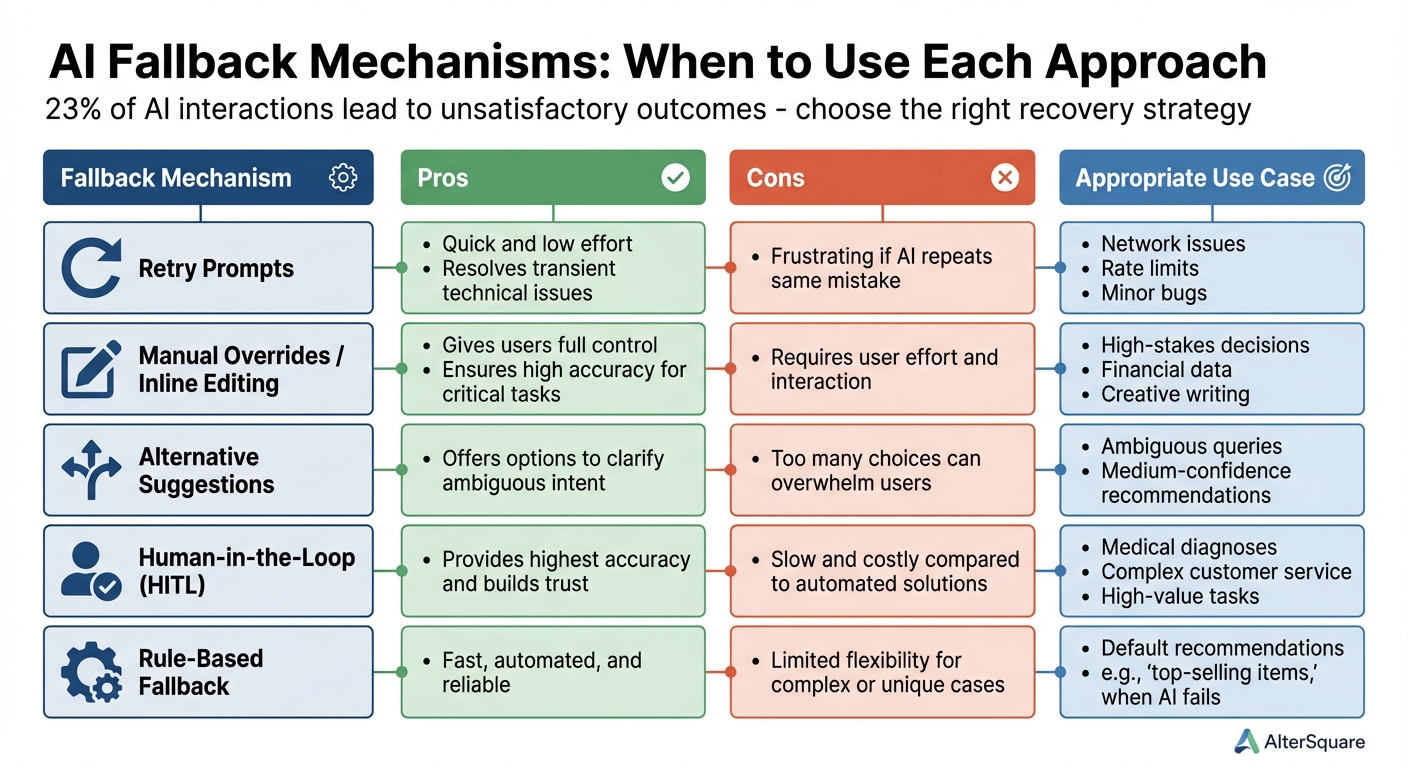
AI Fallback Mechanisms Comparison: Pros, Cons, and Use Cases
When it comes to creating a seamless user experience, fallback systems play a critical role in helping users recover from AI missteps. With about 23% of AI interactions leading to less-than-satisfactory outcomes [13], the difference between a frustrating AI tool and one users genuinely enjoy lies in how effectively it helps them bounce back when things go wrong.
Fallback systems essentially turn AI errors into manageable detours [11]. If the AI misunderstands a request or provides a low-confidence response, users shouldn’t feel stuck. Instead, they need clear and simple ways to keep their workflow moving.
Inline Editing and Retry Options
One of the quickest ways to address AI mistakes is by allowing users to edit the output directly. Inline editing tools make it easy to tweak AI-generated text right where it appears, without needing to start over or re-enter prompts [8][13]. This keeps the interaction smooth and minimizes interruptions.
For technical issues like API timeouts or rate limits, a straightforward retry button can do the trick. However, repeated retries can become frustrating if the same error keeps occurring [13][16]. To address this, systems can use exponential backoff, a method that spaces out retry attempts progressively longer to avoid overwhelming the AI provider during outages [16].
When the AI produces an answer that’s close but not quite right, a "regenerate" option can help. This allows users to request a new attempt without resetting everything. Since AI outputs are non-deterministic, a second try might deliver a better result [2][9]. This approach works particularly well for creative tasks where multiple acceptable answers exist, but it’s less effective for factual queries where accuracy is non-negotiable.
These tools provide immediate fixes that complement the broader fallback mechanisms discussed below.
Comparing Fallback Mechanisms
Different scenarios call for different fallback strategies. Here’s a breakdown of the main options and when to use them:
| Fallback Mechanism | Pros | Cons | Appropriate Use Case |
|---|---|---|---|
| Retry Prompts | Quick and low effort; resolves transient technical issues. | Frustrating if the AI repeats the same mistake. | Network issues, rate limits, or minor bugs [13][16]. |
| Manual Overrides / Inline Editing | Gives users full control; ensures high accuracy for critical tasks. | Requires user effort and interaction. | High-stakes decisions, financial data, or creative writing [13][15]. |
| Alternative Suggestions | Offers options to clarify ambiguous intent. | Too many choices can overwhelm users. | Ambiguous queries or medium-confidence recommendations [13]. |
| Human-in-the-Loop (HITL) | Provides the highest accuracy and builds trust. | Slow and costly compared to automated solutions. | Medical diagnoses, complex customer service, or high-value tasks [11][12]. |
| Rule-Based Fallback | Fast, automated, and reliable. | Limited flexibility for complex or unique cases. | Default recommendations, like "top-selling items", when AI fails [11]. |
The success of these fallback mechanisms depends on the context. For instance, in a recommendation system that works 60% of the time, user satisfaction often hinges on how well the fallback options align with their expectations [17]. These mechanisms not only help users recover but also strengthen trust by reinforcing a sense of control.
Simple Control Tools
In addition to error recovery, simple control tools let users fine-tune AI outputs to better meet their needs. Sometimes, the goal isn’t to fix a mistake but to adjust the AI’s output to match a specific style or tone.
Sliders are a great example. They allow users to tweak parameters like creativity or formality [14]. For instance, a writing assistant might include a slider that ranges from "conservative" to "creative", letting users increase originality when brainstorming or tone it down for formal emails. Similarly, tone switchers enable quick toggling between styles like professional, casual, or technical with a single click [14].
For high-stakes situations, introducing friction as a feature can be beneficial. Adding confirmation dialogs or review screens at critical points encourages users to evaluate AI outputs carefully instead of accepting them at face value [2]. As Microsoft’s Responsible AI Principles emphasize, the goal is to position AI as a tool that complements human judgment rather than replacing it [15].
When done right, fallback systems and user controls aren’t just safety nets – they’re essential for building trust and ensuring users feel empowered, even when things don’t go as planned [13].
sbb-itb-51b9a02
User Feedback and Trust Building
User feedback plays a key role in building trust. The aim is to help users develop what researchers call "calibrated trust." This means users should understand where AI excels and where it might fall short, instead of blindly accepting every result or completely disregarding the tool [6]. Feedback systems are an extension of the design process, actively involving users in improving AI performance.
Detailed Feedback Systems
Like visual cues and fallback options, feedback systems are essential for managing AI uncertainty. The best systems gather input naturally during regular use, rather than feeling like an afterthought. For instance, Microsoft Excel’s Ideas feature uses simple prompts like "Is this helpful?" alongside AI suggestions, making feedback collection feel seamless [19][18]. This approach captures detailed user preferences.
Interestingly, feedback doesn’t always need to be explicit. Manual edits, for example, are a strong indicator of trust [6]. When users frequently adjust or override AI outputs, it’s a clear sign that the system isn’t fully meeting their needs.
To address this, make it easy for users to edit, refine, or undo AI-generated outputs. These actions provide valuable insights into system shortcomings [19][6]. A simple framework like Accept, Edit, or Dismiss can turn these interactions into actionable data [21], effectively turning users into collaborators in improving the system.
"Confidence isn’t just a number – it’s a trust signal." – Abdul-Rashid Lansah Adam, Product Designer [21]
For high-stakes applications, consider adding deliberate friction points, such as confirmation prompts or AI-generated critiques. These "cognitive forcing functions" encourage users to pause and verify results, reducing the risk of errors [4].
Testing Uncertainty Through Prototyping
Prototyping is a practical way to test and refine user trust in real time. Rapid prototyping, in particular, helps gauge reactions to AI uncertainty. One effective method is "sandbox" prototyping during onboarding. This creates a low-pressure environment where users can safely explore the AI’s capabilities and limitations [10]. It’s a hands-on approach that builds user understanding faster than traditional tutorials.
Embedding live analytics into prototypes adds another layer of insight. Instead of relying solely on generic surveys, you can use targeted follow-up questions like "Did this fix the issue?" or "Was this recommendation relevant?" right after an interaction [5]. This combines qualitative and quantitative data to create a fuller picture of user experience.
Experimenting with "what if" scenarios can also help users understand system boundaries [10]. For example, a financial forecasting tool might let users tweak variables in real time to see how predictions change, offering a clearer sense of the AI’s capabilities.
Trust Calibration Methods
The insights gained from prototyping feed directly into methods for calibrating user trust. Trust in AI relies on three key factors: Ability (does it perform the task well?), Reliability (is it consistent?), and Benevolence (does it aim to help the user?) [10]. Measuring and adjusting these factors requires both technical data and user perception.
One approach is Multiple Agent Validation Systems (MAVS), where secondary AI agents monitor the primary AI’s outputs. These synthetic users evaluate responses on a 1-5 scale based on relevance, accuracy, and alignment with brand standards [5]. This system helps identify and address potential issues before they reach actual users.
For direct user feedback, trust is often measured using a 1-7 Likert scale focusing on reliability, confidence, and predictability [6]. Behavioral metrics, such as how often users verify AI results, edit outputs, or repeatedly use a feature, also provide valuable insights [6].
The goal is calibrated trust – where users know when to rely on the AI and when to question it. Striking this balance avoids both distrust (which can lead to users abandoning the product) and over-trust (which can result in risky automation bias) [6]. As Rebecca Loar, VP of Product at Invene, put it, "A 95 percent accurate system can still feel like five nines if you design around its limitations" [20].
AlterSquare‘s Approach to AI Interface Design
AlterSquare takes a fresh approach to AI interface design, offering startups a flexible framework that aligns with their fast-paced needs. Instead of treating AI interfaces as rigid structures, the company sees them as a dynamic "scaffold" – a foundation that evolves alongside the product. By keeping UI design separate from the AI engine, AlterSquare ensures that creative ideas flow freely and that design goals remain intact throughout development[22].
One of their standout principles is the adoption of intent-based interfaces. This approach shifts the focus to letting users express their intentions directly, transforming how input fields and feedback systems are designed. It’s a whole new way of thinking about interfaces, one that also tackles the challenge of managing AI uncertainty head-on.
The I.D.E.A.L. Framework for AI Products
AlterSquare’s work revolves around its I.D.E.A.L. Framework, which stands for Iterative Development, Empathy-Driven Design, Agile Prototyping, Lean Execution, and Post-Launch Refinement. Here’s how each element plays a role:
- Iterative Development: Continuous cycles of training and testing ensure user feedback directly shapes AI model improvements.
- Empathy-Driven Design: Interfaces are built to address user concerns, particularly around AI errors, fostering trust and reducing anxiety.
- Agile Prototyping: Failure scenarios – like when AI delivers incorrect results – are treated as essential flows, not exceptions, and are rigorously tested early on[9].
- Lean Execution: Teams stay focused on delivering functional MVPs quickly, avoiding unnecessary complexity.
- Post-Launch Refinement: Real-world usage data is used to fine-tune accuracy and build trust over time.
The framework also introduces four interaction modes tailored for AI products: Analyzing (always-on agents monitoring user activity), Defining (capturing user intent through natural language), Refining (enabling users to adjust outputs iteratively), and Acting (automating tasks in the background)[5]. Together, these approaches support fast, user-centric development processes, particularly suited for startups.
90-Day MVP Program for AI Products
To help startups move quickly without compromising on quality, AlterSquare offers a 90-day MVP program. This program combines rapid prototyping with real-time user feedback, allowing teams to test how AI handles uncertainty in practical settings before scaling up. The program starts at $10,000, making it accessible for early-stage companies aiming to launch swiftly and effectively.
Client Success Stories
AlterSquare has a track record of stepping in during high-stakes moments. For instance, they salvaged an AI-powered feature for a client, resulting in increased revenue and happier customers. Clients often highlight their ability to create reliable recovery paths rather than chasing perfection. By designing interfaces that gracefully handle AI missteps, AlterSquare helps startups maintain user trust, speed up product launches, and build the confidence needed for long-term success[9].
Conclusion
The best AI interfaces don’t try to hide their flaws. Instead, they openly acknowledge uncertainty, giving users the tools to correct mistakes and provide feedback. Errors aren’t treated as rare embarrassments but as opportunities to improve the experience.
Three key principles stand out: transparency, user control, and iterative feedback. Transparency involves showing users where answers come from and how confident the system is. User control allows people to edit, retry, or choose between different options. Iterative feedback creates a loop where users can point out when the AI misses the mark. As Victor Yocco wisely states:
"Trust is not determined by the absence of errors, but by how those errors are handled" [6].
This means the interface should perform at its best when the AI stumbles, turning mistakes into moments of trust-building.
For startups, the challenge lies in implementing these ideas without overcomplicating the design. It’s crucial to plan for mistakes early on and create recovery flows that feel natural. By clearly signaling uncertainty and making error recovery seamless, startups can achieve what researchers call "calibrated trust" – where users know when to rely on the AI and when to double-check [6].
To help startups tackle these challenges, AlterSquare’s I.D.E.A.L. Framework offers a practical solution. Their 90-day MVP program, starting at $10,000, enables companies to quickly prototype interfaces that handle errors gracefully. By testing these designs with real users and refining them based on feedback, startups can launch AI products that earn trust – not by being perfect, but by being honest about their limitations and empowering users to stay in control.
FAQs
How can visual cues help users interpret AI uncertainty?
Visual cues play a key role in helping users grasp the uncertainty in AI outputs. Tools like confidence scores, color-coded signals, or progress bars can quickly show how certain the AI is about its predictions or decisions. These straightforward visual aids allow users to gauge the reliability of the information with just a quick glance.
To make things even clearer, you can combine these cues with features like suggested alternatives, source references, or prompts that encourage users to double-check outputs flagged as less reliable. This not only builds trust but also equips users to make better decisions – especially in situations where precision matters or the AI’s response feels unclear.
What are some practical ways to handle AI errors in user interfaces?
To effectively manage AI errors in user interfaces, it’s important to have fallback mechanisms that emphasize clarity and give users control. For instance, systems should be designed to recognize situations where AI confidence is low or an error has occurred, and then communicate this transparently to users. Offering alternatives like manual overrides or helpful suggestions can go a long way in preserving trust and ensuring usability.
Incorporating user feedback loops and providing clear instructions for fixing errors or bypassing incorrect outputs is equally essential. These measures empower users to handle issues on their own, reducing frustration. By adopting these approaches, you can create a more dependable and user-friendly experience, even when AI performance is less than perfect.
Why is it important to be transparent about AI’s uncertainty in interface design?
Transparency in AI interface design is crucial because it allows users to grasp how the system operates and recognize when its results might be uncertain or less reliable. For example, incorporating features like confidence indicators or detailed explanations can help users make smarter decisions without blindly relying on AI predictions that might not be entirely accurate.
When people understand the boundaries of an AI system, they’re more likely to trust its outputs. Tools like fallback options, feedback loops, and clear reasoning behind decisions not only build trust but also make the experience easier and more intuitive. By prioritizing transparency, users are empowered to feel more confident and in control while engaging with AI technologies, promoting both wider use and responsible interaction.





Leave a Reply