

Dealing with outdated frontend code is tough, but tackling it step-by-step works better than a complete rewrite. Here’s the deal:
- jQuery still powers 72% of websites in 2026, creating huge technical debt. Legacy tools like AngularJS (EOL in 2021) and Internet Explorer 11 (discontinued in 2022) add to the problem.
- Outdated codebases lead to bloated bundles, slow performance, and poor SEO rankings (e.g., Core Web Vitals like INP matter now more than ever).
- Incremental modernization is safer and faster than starting from scratch. It reduces risks, avoids burnout, and delivers results sooner.
Key Steps to Modernizing Frontend Code:
- Assess the Codebase: Use tools to map outdated patterns, dead code, and dependency issues.
- Set Measurable Goals: Track metrics like performance (LCP, INP), developer efficiency (build times), and business KPIs (conversion rates).
- Phased Updates: Start small with the Strangler Fig Pattern – replace parts of the old system gradually.
- Modular Refactoring: Centralize shared components and reduce duplication using monorepos and tools like Storybook.
- Adopt Modern Frameworks: Introduce frameworks like React or Vue piece-by-piece, using feature flags and module federation.
- Upgrade Build Tools: Switch to Vite or Webpack 5 for faster builds and better performance.
- Optimize Performance: Use code splitting, lazy loading, and modern rendering techniques (SSR, SSG) to improve load times.
- Leverage Microfrontends: Split apps into independent modules for better team autonomy and faster updates.
Incremental modernization avoids the risks of full rewrites while improving performance, scalability, and developer experience. Start with small wins, track progress, and modernize one piece at a time.
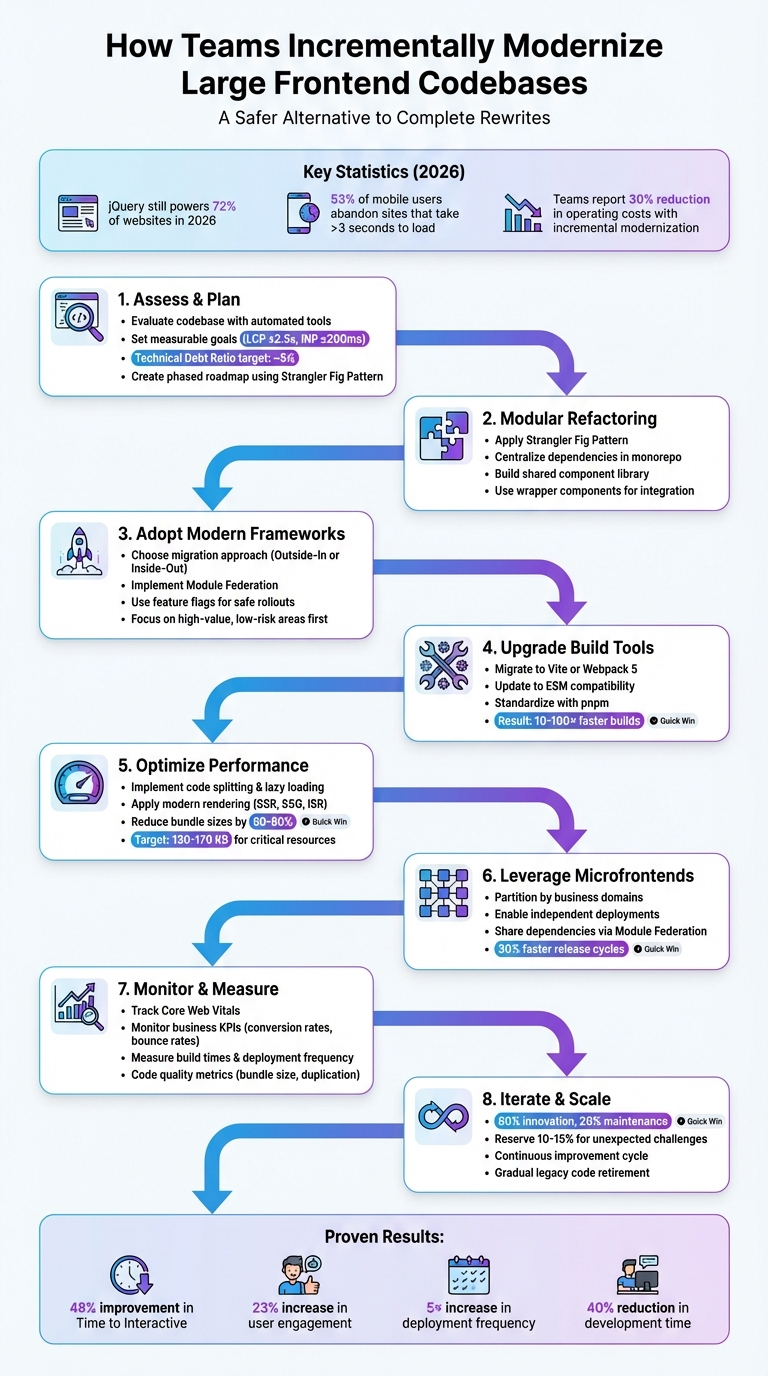
8-Step Frontend Modernization Process: From Assessment to Microfrontends
Step 1: Assess and Plan the Modernization Roadmap
Evaluating the Current State of the Codebase
The first step in modernization is understanding your current codebase. Automated tools can be a huge help here. AI-driven assessment tools can scan your repository to identify outdated patterns, like AngularJS scopes or jQuery handlers, and even highlight unused or "dead" code. For performance metrics, tools like Lighthouse can give you a starting point by measuring Core Web Vitals, such as an INP of ≤200 ms and an LCP of ≤2.5 seconds. Beyond performance, it’s important to pinpoint modules with high defect rates or frequent issues. Mapping out your component structures, routes, and API calls will give you a clear picture of how everything connects, helping you avoid surprises when changes are made.
Don’t forget to review your dependencies. Libraries that are no longer maintained, pose security threats, or have reached end-of-life should be flagged. One helpful metric to consider is the Technical Debt Ratio (TDR), which measures the cost of fixing your system against the cost of rebuilding it from scratch. A TDR around 5% is generally seen as manageable and can provide a solid case when presenting the modernization plan to stakeholders.
Once you’ve identified the problem areas, set clear, measurable goals to guide your efforts.
Defining Success Metrics for Modernization
Setting measurable goals is essential to track progress and justify the investment. Start by focusing on user performance metrics like LCP (loading speed), INP (responsiveness, replacing FID in March 2024), and CLS (visual stability). For instance, faster load times have been shown to boost revenue per session by up to 17%.
In addition to performance metrics, monitor business KPIs such as conversion rates, bounce rates, and SEO rankings to see how modernization affects the bottom line. On the engineering side, track improvements in build times, deployment frequency, and onboarding speed for new developers. Code quality metrics are equally important – look for smaller bundle sizes, reduced code duplication, and fewer regression defects. A real-world example: when Dipp transitioned its graphic editor from React to Svelte 5 in 2024–2025, they reduced the bundle size by 23% (from 8.5MB to 6.5MB) and cut feature development time by over half.
With these metrics in place, you can confidently create a roadmap to tackle the challenges step by step.
Creating a Phased Modernization Plan
A phased approach is the best way to manage a modernization project without overwhelming your team or introducing unnecessary risk. One popular strategy is the Strangler Fig Pattern, which involves building new functionality outside the legacy codebase and gradually shifting traffic to the updated system. This method allows you to make progress while still maintaining the stability of your existing application.
Start by identifying natural divisions within your application, such as specific business functions, read-heavy endpoints, or areas with frequent bugs. Introduce a routing layer or API gateway to control which parts of the system handle specific requests, allowing you to transition traffic smoothly. Use feature flags to deploy new code incrementally, making it easier to roll back changes if needed. Focus on high-impact, low-risk areas first to secure quick wins and improve the developer experience without jeopardizing critical functionality. To ensure a seamless user experience, maintain consistency in shared UI elements like headers and footers across both the legacy and modernized platforms.
Finally, balance your resources wisely. Dedicate about 80% of your efforts to innovation and 20% to maintenance, while reserving 10–15% of your time for unexpected challenges. This approach keeps the project moving forward while leaving room to address any surprises along the way.
sbb-itb-51b9a02
Back to Basics: Modernizing Monolithic Applications Using Cloud Strangler Pattern
Step 2: Modular Refactoring and Incremental Changes
Building on the phased roadmap from Step 1, teams can start implementing modular refactoring to modernize systems without disrupting ongoing operations.
Using the Strangler Fig Pattern for Refactoring
The Strangler Fig Pattern takes inspiration from the Australian strangler fig, a vine that grows around a host tree, eventually replacing it entirely. This method is particularly effective for frontend modernization. Instead of overhauling the entire system in one go, new functionality is developed alongside the legacy code, with traffic gradually redirected to the updated components.
To implement this, set up a proxy layer – such as an API gateway, reverse proxy, or load balancer – to manage traffic flow between the old and new systems. Look for logical seams in your application, like isolated features (e.g., reporting dashboards, user profiles, or checkout flows), that can be refactored independently.
For example, in 2023, a major grocery retailer modernized its legacy coupon management system using this approach. They started with the /get_coupons endpoint, employing an API gateway to route traffic between outdated RPC endpoints and new RESTful services. This allowed them to replace rigid, underperforming code with a test-driven, well-documented architecture – all while maintaining uninterrupted sales operations [9]. Similarly, Jochen Schweizer mydays Group achieved zero downtime and reduced loading times by 37% during their migration [10].
"The Strangler Fig pattern… involves building a new system around the edges of the old, gradually replacing it piece by piece."
– Premanand Chandrasekaran, Senior Director, ThoughtWorks [9]
When deciding where to start, focus on "thin slices" – small, manageable components that can be replaced quickly but deliver immediate value. Areas with frequent updates, high defect rates, or performance issues are good candidates. Feature flags can help manage rollouts, providing an easy way to revert changes if problems arise.
Once critical components are refactored, the next step is to unify shared resources across the codebase.
Centralizing Dependencies and Design Tokens
During the refactoring process, you may discover duplicated code shared between legacy and modern systems. Centralizing these shared dependencies is essential to streamline development. A monorepo structure with a private component library can ensure that both legacy and new applications access the same resources [2].
In August 2025, Conductor (formerly Searchmetrics) tackled this challenge. Senior Software Engineer Andreja Migles and Senior Developer Sarah Wachs led a project to refactor their outdated design system into a shared, interactive component library integrated with Storybook. This provided developers with visual documentation and allowed them to quickly adopt enhanced components in new views, significantly reducing code duplication across their product suite [2].
"The old library was difficult to maintain, as every change introduced bugs or made it hard to extend some of the components. Working with the Crocoder team, we were able to rethink the architecture, implement new core components quickly, and start using them alongside the existing ones."
– Andreja Migles, Senior Software Engineer, Conductor [2]
To integrate new components with legacy systems, use wrapper components like Web Components or Custom Elements. Employ Shadow DOM for style isolation, and treat the legacy system as an external dependency with explicit API contracts and event schemas to ensure stability. In 2025, Mister Spex built a centralized component library to replace a fragmented legacy frontend. This allowed multiple teams to share UI elements more effectively, improving alignment between design and development during their transition to React and Next.js [2].
Step 3: Adopting Modern Frameworks Incrementally
Once you’ve centralized shared dependencies and started modular refactoring, it’s time to introduce modern frameworks like React or Vue. By adopting these frameworks gradually, you can modernize your application step by step while avoiding major disruptions.
Building New Components in Modern Frameworks
When migrating, teams typically choose between two approaches: page-by-page or component-by-component. The page-by-page method is often simpler and a good starting point since it avoids complex dependencies across applications. On the other hand, the component-by-component approach offers more control but can impact performance due to the need to load two frameworks simultaneously [11][6].
You’ll also need to decide on a migration strategy: Outside-In or Inside-Out.
- Outside-In: This involves migrating the application shell first – your router and layout – before replacing legacy pages one by one at the route level. While this approach delivers immediate benefits from the new framework, it requires more upfront effort to set up infrastructure.
- Inside-Out: Here, you keep the legacy shell and gradually replace parts of the application by embedding modern components into existing pages. This method allows for exploration but can present challenges with state sharing and orchestration [7].
For example, in July 2024, Airbnb upgraded its web surfaces from React 16 to React 18 using a custom "React Upgrade System." They employed module aliasing to run two React versions simultaneously within their monorepo and used Kubernetes for environment targeting and A/B testing. By deploying separate build artifacts for "control" (legacy) and "treatment" (modern) versions, they rolled out the upgrade incrementally across their Single Page Apps without requiring a rollback [8].
Module Federation is another effective strategy for introducing modern frameworks while maintaining compatibility with legacy systems. This approach allows separate builds to function as a single application, with the legacy host consuming modern modules at runtime. Using Shadow DOM can help isolate modern components and avoid CSS conflicts. Start small with isolated UI elements like modals, notifications, or footers to test integration [13][14].
"To make upgrading not require a heroic effort, staying current should be a continual effort spread out over time, rather than a large, one-off change."
– Andre Wiggins, Engineer, Airbnb [8]
Focus on migrating high-value, low-risk areas. Pages or components that users frequently interact with but are technically straightforward make excellent candidates. Another strategy is velocity-driven selection – prioritize migrating the most frequently updated pages to boost development speed and reduce technical debt in active areas [11][6]. Loosely coupled modules, such as read-only data views or those with clear API boundaries, are also easier to extract and migrate [5].
Once you’ve chosen your migration approach, it’s crucial to plan for potential risks.
Managing Migration Risks During Framework Adoption
Risk management is a key part of framework adoption. Feature flags are indispensable – they let you route traffic to new components conditionally and enable quick rollbacks if problems arise [11][14]. In August 2025, Mister Spex successfully integrated modern React and Next.js components into their existing architecture using wrapper layers and feature flags, avoiding duplicated UI across distributed teams [2].
Observability tools are essential for identifying errors and performance drops early. Use end-to-end tests to verify feature parity and ensure functionality in real-world conditions [7]. When upgrading frameworks, test both versions and maintain a "permitted failures" list to track and resolve issues incrementally without blocking deployment pipelines [8].
Avoid combining major UX updates with framework migrations, as this can lead to scope creep and extend timelines. Keep the user experience consistent while focusing on the underlying technical changes [7]. Tools like custom ESLint rules and codemods can help automate the transition to new coding standards and prevent the reuse of outdated patterns [7].
If needed, use iframes to isolate legacy code while migrating features. This approach prevents unintended interactions between old and new systems [12]. However, staying in a transitional state for too long can increase complexity. Set clear goals and track progress, such as by charting the percentage of remaining legacy code [7].
"Modernization works best as a measured evolution, not a rewrite. By running legacy and modern systems in parallel… companies can deliver continuous upgrades without business disruption."
– Alex Kukarenko, Director of Legacy Systems Modernization, Devox Software [5]
Adopting a hybrid migration approach can significantly reduce costs and improve efficiency. For instance, teams have reported up to a 30% drop in operating costs and a fivefold increase in deployment frequency. Additionally, using TypeScript during these migrations has been shown to cut production defects by 15–20% in large enterprise teams [5].
Step 4: Upgrading Build Tools and Toolchain
Once you’ve embraced modern frameworks, the next step is upgrading your build tools and toolchain. This phase builds on your earlier updates, aiming to streamline development and eliminate bottlenecks caused by outdated tools. Tools like Create React App (CRA) or older Webpack versions can slow your progress. For example, if your dev server takes over 30 seconds to start or Hot Module Replacement (HMR) drags on for 3–5 seconds, it’s time to move forward [17]. Outdated tools also come with security risks and limit your ability to use native ECMAScript Modules (ESM) [18][15].
Switching to modern tools like Vite or Webpack 5 can make a noticeable difference. These upgrades speed up dev server startup times and enable native ESM support. For instance, in April 2025, Retool transitioned from Webpack to ViteJS, led by Software Engineer Juan Lasheras. This shift slashed dev server startup times from 30 seconds–2 minutes to near-instant speeds, while the team updated their entire codebase to ESM [15]. Similarly, Codacy moved from CRA to Vite in October 2025, cutting CI workflow times by 80% – from 15 minutes to just 3 minutes – and resolved 11 security vulnerabilities tied to legacy Webpack dependencies [18].
"Web development hasn’t felt this fast and responsive since the days before NodeJS+NPM introduced slow compilation steps into the development flow."
– Juan Lasheras, Software Engineer, Retool [15]
Transitioning to Modern Build Tools
Switching build tools isn’t something you rush. A well-planned approach ensures your team can continue working without interruptions. Retool, for example, used a cookie-based feature flag system at the server level (Nginx) to serve either the Webpack or Vite bundle based on the user. This allowed for a gradual rollout over one month [15]. A "lift and shift" strategy works well here – set up a fresh toolchain and migrate code incrementally to avoid dependency conflicts [21].
Before diving into tools like Vite, update your codebase for ESM compatibility. Replace require() with import and swap module.exports for export. Tools like Biome can automate adding .js extensions to imports, a requirement for ESM [20]. If your test suite doesn’t fully support ESM, maintain a dual-compliant codebase, using CommonJS for tests and ESM for development [15][20].
Modern build tools bring clear benefits. Vite, for instance, uses native ESM to serve source code on-demand, reducing HMR updates to 50–200ms compared to the sluggish 3–5 seconds of older Webpack setups [17]. Its dependency pre-bundling, powered by esbuild, is 10–100x faster than traditional JavaScript bundlers [17]. Production builds also see improvements, with minification and compression cutting text-based asset sizes by up to 70% [16].
Pairing these upgrades with better package management practices can supercharge your workflow.
Standardizing Package Management
As you modernize your build tools, it’s equally important to refine your package management. Tools like pnpm offer a structured node_modules layout that prevents dependency issues and speeds up installations with content-addressable storage [19][20]. For example, in December 2024, developer Kevin Pennarun revamped a TypeScript monorepo by moving from Yarn 1 to pnpm 9. The result? A 134% boost in P95 response times and a jump in request success rates from 87% to 98% [20].
Start by cleaning up your package.json. Remove outdated settings like nohoist and minimize forced dependency resolutions [18][20]. Add "type": "module" to enable ESM compatibility with modern tools [20]. Use tools like depcheck or ESLint to audit and remove unused dependencies, which can help reduce build times and improve security. Finally, explicitly install missing dependencies in each package instead of relying on hoisting from the root. This ensures consistent behavior across both local and CI/CD environments [20].
"Moving from CRA to Vite wasn’t just a simple upgrade; it was an escape from a deprecated ecosystem that was actively creating security risks and holding us back."
– Inês Gomes, Codacy [18]
Step 5: Optimizing Performance and Scalability
Now that your build tools are up to date, it’s time to focus on making your application faster and more scalable. Large JavaScript bundles can slow down page loads, frustrating users and causing them to leave. In fact, 53% of mobile users abandon a site if it takes longer than three seconds to load [27]. With the average JavaScript bundle size at 464 KB for desktop and 444 KB for mobile [27], trimming down these bundles is critical to keeping users engaged and boosting conversions.
Modern techniques like code splitting, lazy loading, and server-side rendering can significantly improve performance without requiring a complete overhaul. These approaches build on your upgraded tools to directly reduce load times and make your app more scalable.
Code Splitting and Lazy Loading
Code splitting breaks your JavaScript into smaller, more manageable chunks, ensuring the browser only downloads what’s necessary for the initial render [22][23]. This approach prioritizes critical code first and defers the rest until needed.
A good starting point is route-based splitting, which offers a solid balance between effort and impact [27]. For instance, the code for a /dashboard route would only load when users navigate to that page, leaving the homepage unaffected. In React, you can use React.lazy() and Suspense to manage component-level splitting while displaying fallback UI like skeleton screens [24][27]. Additionally, dynamic import() allows you to load modules on demand [22][23].
A real-world example from Smashing Magazine demonstrates the power of this technique. Their team reduced an initial page load from 442 KB to 45 KB by dynamically importing the zxcvbn password strength library (800 KB) only when users interacted with the password field [24]. Similarly, Bluesky optimized their internationalization files by loading language-specific modules dynamically using useEffect and await import() [16].
To get started, tools like Webpack or Next.js Bundle Analyzer can help you identify large dependencies and unused code [24][25][26]. For example, Nadia Makarevich found that importing Material-UI with import * pulled in over 2,000 icons and hundreds of components unnecessarily. Switching to named imports cut the vendor bundle size by 80%, from 5,321.89 KB to 811 KB [26].
"Code splitting and lazy loading can be extremely useful techniques to trim down the initial bundle size of your application, and this can directly result in much faster page load times."
– Houssein Djirdeh, Engineer, Google [22]
Vendor splitting is another strategy, separating third-party dependencies into a distinct bundle. This improves caching efficiency since these dependencies change less frequently than your application code [22][16]. Use Webpack magic comments like /* webpackPrefetch: true */ to preload critical chunks in the background [22][27]. However, avoid over-splitting, as too many small bundles can create network request overhead, especially with HTTP/1.1 [24].
A case study by Coditation highlights the impact of these optimizations. By implementing route-based code splitting and lazy loading in a React app, they reduced the initial bundle size by 62% (from 2.3 MB to 875 KB). This led to a 48% improvement in Time to Interactive (TTI) and a 23% increase in user engagement [27]. Even small improvements matter – every 100ms decrease in homepage load time can boost session-based conversions by 1.11% [27].
Finally, audit your dependencies for unused code and optimize imports. Tree-shaking can remove unused code, but it’s often disabled by import * patterns or older libraries. For example, instead of importing all of Lodash, you can import specific methods like import trim from 'lodash/trim' [26].
Modern Rendering Techniques
Beyond code splitting, modern rendering methods can further enhance performance. Techniques like Server-Side Rendering (SSR), Static Site Generation (SSG), and Incremental Static Regeneration (ISR) allow you to tailor rendering to your app’s needs. Frameworks like Next.js and Nuxt.js make it easy to apply these methods on a per-route basis [29].
- SSG works best for stable content like blogs or documentation, offering near-instant loading via a CDN.
- ISR combines the speed of static content with background revalidation, making it ideal for semi-dynamic content like product catalogs.
- SSR is perfect for personalized or real-time data, ensuring content freshness with every request [29].
Another approach, partial hydration, treats the page as static HTML with interactive "islands." This reduces JavaScript execution and memory usage by avoiding hydration of non-interactive content [28][30]. For example, you can delay hydrating non-critical components like footers, cutting Total Blocking Time by 40% [28]. Progressive hydration techniques have shown to reduce First Input Delay (FID) by up to 50% [28].
"The period between content rendering and hydration completion is a potential performance dead zone."
– Kaitao Chen, Carnegie Mellon University [28]
Feature flags can help you safely migrate to modern rendering techniques, allowing you to route traffic between legacy and modern paths as needed [6][11]. Start with an "outside-in" migration, updating the application shell (router and layout) first. This lets you benefit from a modern stack early while gradually migrating other pages [7]. Skeleton screens can also maintain layout stability, improving perceived performance during hydration [30].
For microfrontends, standardize CSS class names and DOM events to avoid conflicts between different teams’ codebases [30]. Browser hints like <link rel="preload"> and <link rel="prefetch"> can further optimize loading by prioritizing critical resources [22][27].
| Rendering Technique | Best For | Key Advantage |
|---|---|---|
| SSR | Personalized content | Real-time data per request [29] |
| SSG | Stable pages (docs, blogs) | Instant loading via CDN [29] |
| ISR | Product catalogs | Static performance with revalidation [29] |
| Partial Hydration | Mixed content pages | Cuts JavaScript payload significantly [28] |
Minification and compression techniques like Gzip or Brotli can reduce text-based asset sizes by up to 70% [16]. Aim for a performance budget of 130 KB to 170 KB for critical resources to achieve a 5-second Time-to-Interactive on baseline mobile devices [24]. Keep JavaScript execution under 3.5 seconds, as Lighthouse audits will flag longer times [23]. By keeping bundles lean and choosing the right rendering strategy, you can significantly improve both performance and scalability.
Step 6: Using Microfrontends for Team Autonomy
As your application grows and more teams get involved, keeping everyone in sync can become a bottleneck. Microfrontends offer a way around this by breaking your app into smaller, independently deployable pieces, each managed by a single team. This approach lets teams roll out updates without being tied to a centralized release schedule.
The concept is simple: split your application based on business domains rather than technical layers. For instance, one team might own the entire Checkout module, while another focuses on Product Search. This "vertical slicing" minimizes cross-team coordination and gives each group the freedom to work at its own pace. It’s an extension of earlier modernization strategies, designed to empower teams to operate more independently.
"An architectural style where independently deliverable frontend applications are composed into a greater whole."
– Cam Jackson, Consultant at Thoughtworks [31]
Each microfrontend comes with its own CI/CD pipeline, so bug fixes or updates don’t require redeploying the entire app. Teams can also pick the best tools for their needs – like React for a dynamic search feature or Angular for a more structured CMS – and gradually upgrade their dependencies. This flexibility makes it easier to phase out legacy systems using techniques like the Strangler Fig pattern.
Partitioning Codebases into Domain-Specific Microfrontends
After modular updates, breaking your app into microfrontends takes things a step further by reducing coordination headaches. Start by mapping your app into clear business domains like "Orders", "User Profile", or "Analytics Dashboard." Each microfrontend should represent a complete user journey that one team can handle from start to finish.
Take Bandwidth’s migration in July 2024 as an example. Over the course of a year, they updated 1,743 files and over 100,000 lines of code to support Webpack 5 and React 18. Led by senior developer Samir Lilienfeld, the team used a weekly rebase strategy to align their migration branch with the main codebase, minimizing merge conflicts. They also implemented a hotfix process to address minor bugs without rolling back the entire release [33].
During migrations, you can maintain a smooth user experience by hosting legacy code within a new "Base App" using an iframe. For example, an e-commerce team using Single-SPA and Module Federation reported a 30% faster release cycle and a 20% reduction in bundle sizes during their transition [34].
To keep things stable, your host application should focus on essentials like routing, authentication, and global layouts, leaving feature-specific logic to the microfrontends. Wrapping remote components with React Error Boundaries or Angular loading states ensures that failures in one microfrontend don’t crash the entire app. Instead, users see a fallback message like "Feature temporarily unavailable" instead of a blank screen.
Sharing Dependencies with Module Federation
Modern tools like Module Federation are key to making microfrontends work smoothly. Introduced in Webpack 5, Module Federation allows teams to share common libraries while still deploying independently. Unlike traditional build-time integration, it works at runtime, so updates don’t require recompiling the entire application [35].
The setup involves configuring your bundler (Webpack, Vite, etc.) to share libraries like React as singletons. This ensures only one version loads at runtime, avoiding compatibility issues with hooks or context. You can also define version constraints to keep host and remote apps in sync.
Here’s a quick comparison of integration methods:
| Integration Method | Isolation Level | Tech Agnosticism | Deployment Autonomy |
|---|---|---|---|
| Iframes | Very High | High | High |
| Module Federation | Medium | Medium | High |
| Web Components | High | High | Medium |
| Build-time (npm) | Low | Low | Low |
Module Federation relies on a remoteEntry.js file, which acts as a runtime map for locating and loading exposed modules. Some teams also explore Rspack, a Rust-based alternative to Webpack, which offers significantly faster build times and Hot Module Replacement for federated setups [32].
"If your architecture requires another team to coordinate every deploy, you’ve already lost autonomy."
– Sudhir Mangla, DevelopersVoice [32]
For communication between microfrontends, avoid sharing a global state. Instead, use browser-native tools like Custom Events or RxJS Observables to keep boundaries clear. To prevent conflicts, standardize CSS class names, DOM events, and storage keys with prefixes like "cart-" or "auth-". Tools like @module-federation/typescript can help by generating TypeScript definitions for compile-time checks.
If you’re building a shared design system, consider using Web Components with Lit. These lightweight UI elements (less than 10 KB) work across frameworks like React, Angular, and Vue, making them a great choice for consistent design across microfrontends.
Conclusion: Key Takeaways for Incremental Frontend Modernization
Incremental modernization offers a safer alternative to risky, full-scale rewrites. The Strangler Fig Pattern is a reliable approach – develop new functionality outside the legacy system and gradually shift traffic to it until the outdated code can be retired [6][4]. This strategy helps maintain your product’s stability while reducing technical debt over time.
Start with a well-defined plan. Break down your codebase by business domains, focus on high-value, frequently updated modules, and set up shared component libraries right away to ensure consistency across both legacy and modern systems [2].
Once you have a plan, the right tools can further reduce risks. Feature flags and module aliasing are particularly useful for enabling A/B testing, quick rollbacks, and allowing different framework versions to coexist during transitions. Teams that embrace these tools can migrate smoothly without interrupting live functionality.
"The safest upgrades look uneventful on the outside and disciplined on the inside."
– Alex Kukarenko, Director of Legacy Systems Modernization, Devox Software [5]
Incremental updates not only minimize risks but also bring measurable performance boosts. For example, teams using modern tools like Vite or Rspack report build times that are 2–3× faster. Modular frameworks can reduce development time by as much as 40% [1][3]. Infrastructure upgrades can cut operating costs by up to 30% and increase deployment frequency by 5× [5]. By pairing strategic planning with advanced tools, teams achieve greater efficiency in development, deployment, and maintenance. Modernization is an ongoing process – invest in observability, automated testing, and a seamless user experience to ensure success.
FAQs
How does incremental modernization help reduce technical debt in large frontend codebases?
Incremental modernization is a smart way to tackle technical debt by letting teams update outdated frontend codebases bit by bit, all without disrupting the user experience. Instead of overhauling everything at once, developers can gradually replace legacy components, introduce modern frameworks, and improve both performance and scalability over time.
Methods like modular refactoring, microfrontends, and progressive upgrades help ensure that updates are manageable and work seamlessly with existing systems. By addressing problems one step at a time, teams can keep things stable while building toward a more maintainable and scalable future.
What is the Strangler Fig Pattern, and how can it help modernize outdated frontend systems?
The Strangler Fig Pattern offers a practical way to modernize legacy systems by replacing outdated components piece by piece. This gradual approach ensures the system remains operational while new functionality is introduced over time.
The concept takes inspiration from the strangler fig tree, which grows around a host tree and eventually replaces it. In software development, this translates to building new features or modules alongside the existing system, then gradually retiring the old code. This strategy helps lower risks, avoids major disruptions, and makes it possible to update large frontend codebases without pausing development or negatively affecting the user experience.
What are the advantages of using modern frameworks like React or Vue to update legacy frontend systems?
Modern frameworks like React and Vue offer powerful tools for updating legacy frontend systems. Their component-based architecture allows developers to break down large, outdated codebases into smaller, more manageable modules. This modular structure not only simplifies updates but also helps reduce technical debt over time.
On top of that, these frameworks bring noticeable improvements to performance and scalability. They provide features and best practices that make managing user interfaces more efficient while boosting the overall user experience. Teams can also modernize their systems gradually, minimizing disruptions to live products and ensuring a smoother, more sustainable transition.





Leave a Reply