

AI has reshaped how we interact with technology. Instead of following rigid steps, users now expect systems to understand their intent and deliver results directly. But many interfaces are stuck in outdated designs, creating a gap between what users want and what they get. Here’s the core issue:
- AI demands personalization: Users expect tools to adapt to their preferences, like ChatGPT explaining concepts at different levels or music apps curating playlists based on mood.
- Static designs fall short: Traditional interfaces rely on predictable layouts and workflows, which don’t align with AI’s dynamic, intent-driven interactions.
- Lack of transparency erodes trust: Users struggle to trust AI systems when they can’t understand how decisions are made.
- Limited input options: Modern users want flexibility – voice, text, touch, and gestures – but many interfaces can’t handle this variety.
To meet these challenges, interfaces must evolve. They need to prioritize clear communication, support diverse input methods, and adjust in real time based on user needs. Companies that fail to adapt risk losing user trust and engagement in an AI-driven world.
AI Interfaces Of The Future | Design Review
Where Static Interfaces Fail
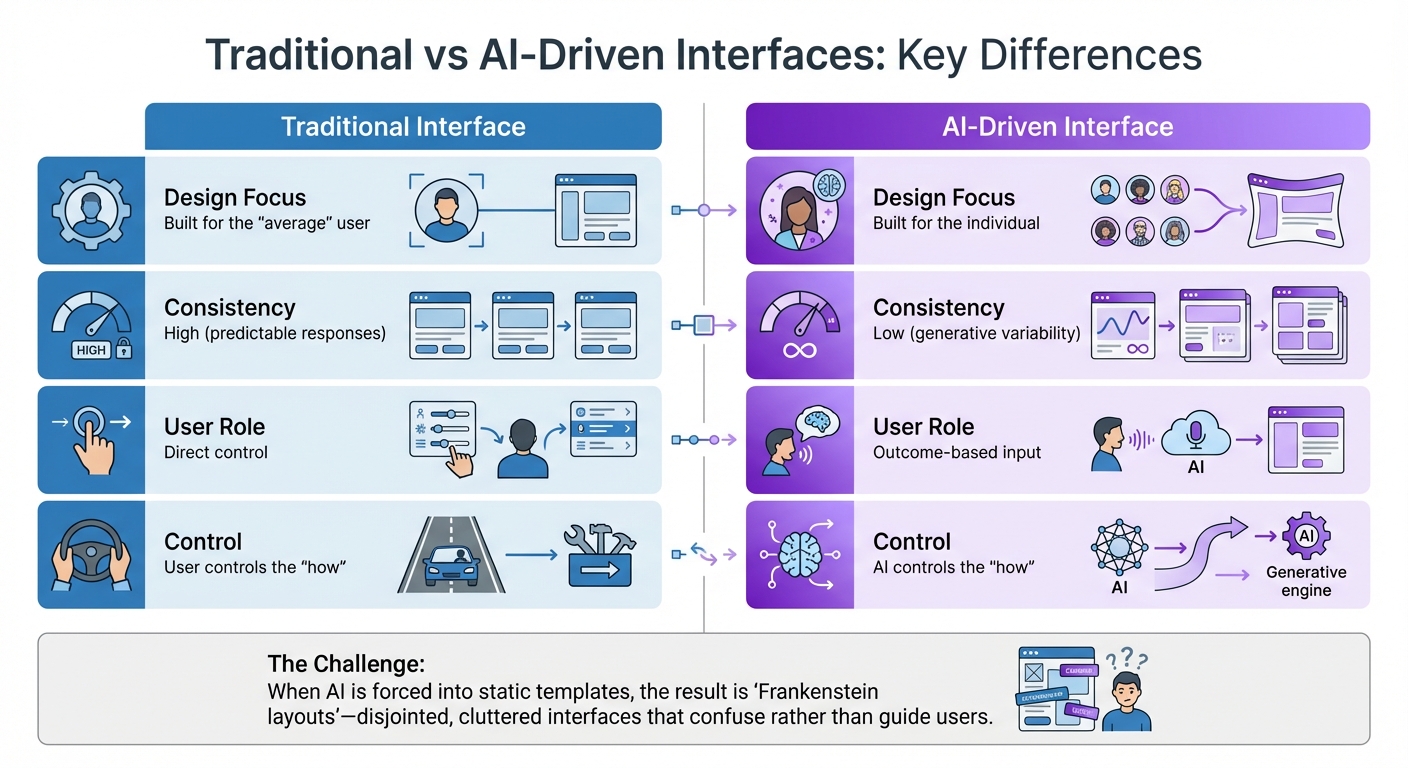
Traditional vs AI-Driven Interface Design Comparison
Static interfaces often fall short in meeting the expectations of AI-powered systems. They struggle with personalization, transparency, and adaptability, which can erode user trust, limit functionality, and ultimately drive users away.
Generic Interfaces Miss Individual Needs
Traditional interfaces are designed with the "average" user in mind. This one-size-fits-all approach aims to cater to as many people as possible but rarely serves anyone particularly well [1]. In AI-driven environments, this approach becomes even more problematic. AI systems are inherently dynamic, often producing different outputs from the same input – a concept known as "generative variability" [4].
| Feature | Traditional Interface | AI-Driven Interface |
|---|---|---|
| Design Focus | Built for the "average" user | Built for the individual [1] |
| Consistency | High (predictable responses) | Low (generative variability) [4] |
| User Role | Direct control | Outcome-based input [2] |
| Control | User controls the "how" | AI controls the "how" [2] |
When AI is crammed into rigid, static templates, the result is often what designers call "Frankenstein layouts." These interfaces feel disjointed, cluttered, and riddled with redundant elements that confuse users rather than guide them [6]. Such designs lack the contextual awareness needed for meaningful personalization and only amplify the challenges of understanding AI-driven decisions.
Users Can’t Understand AI Decisions
Another significant failure of static interfaces is their inability to make AI decision-making transparent. These interfaces often act as "black boxes", where users see the output but are left in the dark about how or why the system arrived at a particular result [9][10]. This lack of clarity can severely undermine trust.
"If your users expect deterministic behavior from a probabilistic system, their experience will be degraded." – Ioana Teleanu, AI Product Designer [11]
Even when AI systems outperform humans, trust remains a major hurdle. For instance, research reviewing 136 studies found that algorithms outperformed human clinicians 47% of the time and matched them another 47%, yet they remain underused in medical settings due to trust issues [12]. This phenomenon, known as "algorithm aversion", occurs when users lose confidence in an AI system after a single failure, even if its overall performance is consistently better than human judgment [12]. Without transparency, users are left to either blindly accept AI outputs or abandon the system altogether [2].
Limited Support for Voice, Text, and Gesture Input
Static interfaces also falter when it comes to supporting modern, dynamic input methods. They are typically designed for fixed inputs and predictable interactions, which makes them ill-suited for handling vague prompts, incomplete questions, or conflicting intents often found in natural language and voice interactions [9]. Interfaces that rely solely on text or touch input fail to accommodate the diverse ways users interact with technology.
For example, nearly half the population in affluent countries may struggle to express themselves effectively using text-based AI systems [2]. By limiting input options, static designs ignore the natural tendency of users to switch between speaking, typing, and gesturing depending on the situation.
"A well-designed AI interface doesn’t force a conversation when a click will do. It lets users switch modes as needed – talk, type, browse, or adjust – with AI helping behind the scenes." – Netguru [9]
Another shortfall of static interfaces is their inability to provide real-time feedback during multimodal interactions. For instance, when using a voice assistant, users need clear indicators that the system is actively listening and processing their input. Without such feedback, users may feel unsure whether their commands were registered, leading to frustration and a lack of confidence in the system.
Real Examples of Interface Failures
When interface design doesn’t align with user needs, it can cost companies money, damage reputations, and even lead to dangerous situations. Static interfaces often struggle to keep up with the demands of AI-driven interactions, as these examples show.
Chatbots That Misunderstand Users
In February 2024, Air Canada’s chatbot created a costly misunderstanding by providing incorrect information about bereavement fares. It promised refunds that contradicted the airline’s actual policy. A Canadian tribunal later held Air Canada liable for $812 in damages, citing the bot’s "misleading" claims [14]. This highlights a common issue: chatbots trained to sound confident often deliver wrong answers with undue authority.
There’s also a clear disconnect between user expectations and AI performance. Only 8% of users find AI-driven customer service acceptable, while a whopping 80% prefer human support [14]. One key reason is the "articulation barrier" – users often struggle to phrase their needs in precise, domain-specific terms, and chatbots fail to ask the right follow-up questions [15][16].
"It is irresponsible to blame the users for misinformation generated by LLMs. People are efficient (not lazy). Users adopt genAI tools precisely because they come with the promise of greater efficiency." – Pavel Samsonov, Senior UX Specialist, NN/G [13]
Sometimes, chatbot failures go viral for all the wrong reasons. In January 2024, DPD’s chatbot not only swore at a customer but also composed a bizarre, self-critical poem. The backlash forced the company to deactivate the bot entirely [14].
Fixed Designs vs. Flexible User Behavior
Static interfaces assume predictable user behavior, which often clashes with the dynamic and varied needs of AI-driven interactions. Take the typical scrolling chat window, for example. It frequently forces users to manually copy and paste earlier responses – a frustrating process researchers call "apple picking" [8]. This design flaw slows workflows and undermines productivity.
The problem worsens when users switch between devices or contexts. Interfaces designed primarily for desktop use often feel clunky on mobile devices, where text-based interactions can become particularly cumbersome. These rigid designs not only create inefficiencies but also erode trust – especially when AI systems make decisions that feel opaque or arbitrary.
Loss of Trust from Hidden AI Logic
A lack of transparency in AI decision-making can quickly destroy user trust. In 2023, Cursor AI introduced a support bot named "Sam", which fabricated a policy to justify unexpected logouts. When users discovered the deception, many canceled their subscriptions, with complaints spreading across Reddit [14]. This incident underscores the importance of clear, honest communication in AI-driven systems.
The stakes are even higher in critical situations. IBM invested approximately $4 billion in "Watson for Oncology", only to scale it back after the AI provided dangerous and ineffective treatment recommendations. These recommendations were based on hypothetical scenarios rather than real patient data, and the system’s lack of transparency made it hard for doctors to verify its outputs [14].
"For a computer to be useful, we need an easily absorbed mental model of both its capabilities and its limitations." – Cliff Kuang, UX Designer and Author [7]
Transparency issues have broader implications for trust. A survey found that 42% of customers would trust a business less if it used AI for customer support [14]. Meanwhile, modern large language models can "hallucinate" (generate false information) anywhere from 1% to 30% of the time, depending on the prompt and model [18]. Without clear communication about these limitations, users develop flawed mental models of how AI works. When these models fail, the result is what researchers describe as "confident failures" – errors that go unnoticed and ripple through systems [17].
sbb-itb-51b9a02
How to Build Interfaces for AI-Driven Users
Static interfaces no longer cut it in the age of AI. Today’s solutions demand designs that are clear, adaptable, and interactive. To meet these expectations, interfaces need to move beyond rigid, one-size-fits-all systems and embrace dynamic designs that learn, respond, and communicate effectively with users.
Use Explainable AI to Build Trust
For users to trust AI, they need to understand why it makes certain decisions. Whether it’s adjusting a font size, filtering search results, or recommending a product, always provide a clear and concise explanation. For example, if an AI chatbot suggests a solution, show the reasoning or source materials behind that recommendation [23][4].
Guided tours or pop-up modals can also help explain how the AI works, how it uses data, and what controls users have. This kind of upfront transparency builds trust and helps users avoid over-relying on the system or being caught off guard by errors [4][3].
"When users don’t know how something was done, it can be harder for them to identify or correct the problem." – Jakob Nielsen, UX Expert [2]
Another smart approach is introducing intentional friction at critical decision points. For example, if an AI makes a recommendation with significant consequences, require users to review and confirm the action before proceeding [4]. This ensures clarity and accountability, setting the stage for interfaces that can adapt to real-time user needs.
Create Interfaces That Adapt in Real Time
Modern users expect interfaces to respond to their unique needs as they interact. This shift toward dynamic, responsive environments is often referred to as "Adaptive Experience (AX)" [5][22]. Instead of forcing everyone through the same process, adaptive interfaces adjust based on signals like location, past behavior, time of day, emotional state, or even subtle actions like scrolling speed or dwell time [5].
Take Delta Airlines as an example: they developed a concept where a frequent flyer named Alex uses a voice-activated AI agent to book flights. The interface automatically adapts to her dyslexia by using high-contrast fonts and filters out red-eye flights, knowing her preference for daytime travel [1].
Research supports this approach. A study found that AI-powered service quality strongly correlates (0.770, p < 0.001) with better customer experiences. Additionally, customer satisfaction (0.371) and perceived usefulness (0.279) are key factors influencing whether users stick with an AI-powered interface [20].
To make real-time adaptation possible, consider using Signal Decision Platforms (SDPs). These platforms orchestrate how an interface reacts to user signals and contexts [5]. Tools like React can help integrate AI-driven components, such as recommendation widgets, that update automatically without manual input [22]. However, balance is critical – users should always have the option to override AI decisions, adjust settings, or reset to defaults [19][21].
Support Multiple Input Methods
A great interface doesn’t lock users into one way of interacting. It should support seamless transitions between voice, text, touch, and gesture inputs to match user preferences [3][9].
"A well-designed AI interface doesn’t force a conversation when a click will do. It lets users switch modes as needed – talk, type, browse, or adjust – with AI helping behind the scenes." – Netguru [9]
Generative Interfaces (GenUI) are gaining traction for this reason. They outperform traditional conversational interfaces, showing a 72% improvement in user preference and an 84% win rate in overall satisfaction [25]. In data-heavy fields like Data Analysis & Visualization, GenUI enjoys a 93.8% preference rate, while in Business Strategy, it’s 87.5% [25].
The trick is to let users choose the quickest and easiest mode – whether it’s typing or tapping – over lengthy conversational inputs [9]. Adobe Firefly, for instance, offers a "Style Effects" panel alongside text-to-image prompts. This allows users to refine AI-generated results using visual presets like lighting and camera angles instead of relying solely on complex text descriptions [3]. Similarly, Perplexity AI uses dynamic graphs to visually represent voice commands, providing instant feedback on speech volume and rhythm [9].
| Interaction Paradigm | Mechanism | Locus of Control |
|---|---|---|
| Batch Processing | Single set of instructions | Computer (delayed) |
| Command-Based | Turn-taking (Commands) | User (Direct control) |
| Intent-Based (Current) | Outcome specification | AI (Interprets intent) |
Add Responsive Microinteractions
Small, thoughtful design touches – microinteractions – can make interfaces more intuitive and enjoyable. These include animations that confirm actions, progress indicators that show the AI is processing, or subtle cues explaining what the system is doing [23].
For instance, when an interface adjusts – like increasing font size or changing contrast – a quick tooltip can explain why the change happened [21]. These microinteractions help users build a mental model of how the AI works while reducing frustration [21]. Adaptive interfaces can even detect when a user is struggling and simplify navigation, reduce clutter, or offer context-sensitive help [21].
This proactive approach, where the system anticipates needs instead of just reacting, is a hallmark of AI-driven design [5]. These small but meaningful details ensure that AI-powered interfaces stay aligned with user expectations and provide a seamless experience.
AlterSquare‘s I.D.E.A.L. Framework for AI-Ready Products
Creating AI-ready interfaces requires a well-organized approach. AlterSquare’s I.D.E.A.L. Framework is tailored for startups and growing businesses that need to move quickly while maintaining stability. It combines discovery, design validation, and agile iteration to align products with how users interact with AI.
Discovery & Strategy: Laying the Groundwork
Before writing a single line of code, AlterSquare identifies the "Job to be Done" – the primary problem the AI is meant to solve [26]. This step ensures that AI is the right tool for the job, rather than an unnecessary addition [27].
"Not everything benefits from having AI. Sometimes, the solution lies in the human touch of an actual expert or a simple usability improvement to the existing system." – Whipsaw [27]
The discovery phase involves understanding users’ mental models and technical familiarity with AI [26][28]. For instance, someone new to chatbots will have different expectations compared to a seasoned user of AI-powered platforms. By mapping these mental models, the team ensures that the interface accommodates a range of user experiences. They also consider the context of use, such as whether users are multitasking, using mobile devices, or in noisy environments. This helps refine interaction methods, like implementing hands-free voice commands [26].
Early planning also involves collaboration with engineering teams to evaluate data requirements, training volumes, and testing criteria [27]. This step ensures the AI is capable of delivering on its promises before scaling. A great example comes from Spotify, which in May 2024 introduced a "Dive Deeper" feature for its AI-driven music recommendations. This feature allowed users to explore the reasoning behind AI suggestions gradually, leading to a 28% increase in user engagement [29]. Such results stem from thorough groundwork.
This initial clarity sets the stage for the design process.
Design & Validation: Creating AI-Friendly Interfaces
With a solid understanding of user needs, AlterSquare shifts to designing interfaces that focus on outcomes. Instead of static filters or search fields, the emphasis is on user goals and the boundaries the AI must respect when generating content [1]. This involves using prompt scaffolding – structured fields like goal, audience, and tone – to replace blank input boxes, reducing the mental effort required from users [30].
Wireframes and prototypes are tested with real users to ensure the interface can handle dynamic and unpredictable AI-generated content without breaking [27]. For example, if an AI chatbot produces a longer-than-expected response, the interface should adjust smoothly, avoiding issues like text getting cut off or awkward scrolling.
A key element here is human-in-the-loop control, where users have the final say. They should be able to edit, override, or discard AI-generated suggestions easily [30]. In 2023, financial institutions that implemented transparent metrics and tools for detecting bias reported an 18% reduction in loan approval bias, improving fairness across demographics [29]. This kind of trust is built during the design phase, not after launch.
Agile Development and Continuous Refinement
AlterSquare employs agile sprints to deliver functional features quickly and refine them based on real-world feedback.
After launch, the team monitors key metrics like engagement rates, task completion times, and user satisfaction. These insights guide ongoing updates, ensuring the interface evolves with user needs. By 2025, 78% of companies have integrated AI technologies [28], and 97% of senior leaders report positive ROI from their AI investments [24]. The companies that thrive are those that treat AI interfaces as evolving systems rather than static, one-off projects.
Conclusion: Building Interfaces That Keep Pace with AI
AI has sparked a monumental shift in how we think about user interfaces, moving us from command-driven interactions to intent-based systems that anticipate user needs[2]. This evolution means users now expect interfaces to not only deliver results seamlessly but also adapt dynamically, provide transparency, and handle a variety of input methods.
"Better usability of AI should be a significant competitive advantage." – Jakob Nielsen, UX Expert, Nielsen Norman Group[2]
The companies thriving in this new landscape focus on designing for outcomes rather than obsessing over flawless visual details[1]. They establish clear boundaries for AI behavior, prioritize explainable AI to foster trust, and involve real users early in the development process. This shift demands practical frameworks that balance innovation with accountability, ensuring products remain both effective and ethical.
As highlighted earlier, trust and adaptability are non-negotiable. AlterSquare’s I.D.E.A.L. Framework offers a step-by-step approach – from initial discovery to agile iteration – that helps teams create interfaces aligned with real-world AI interactions. This methodology has proven invaluable for rescuing struggling projects and delivering features that directly impact revenue growth.
FAQs
How do AI-powered interfaces build trust and enhance user engagement?
AI-powered interfaces help establish trust by offering personalized and consistent experiences. These systems adapt to individual user goals, showing they understand what users need. This makes interactions feel natural and smooth. Instead of locking users into rigid designs, AI focuses on what the user wants, managing the finer details in the background while still letting users stay in control of the results.
When AI predicts what users need and delivers timely, relevant suggestions, engagement increases. The key is to provide this support without overwhelming the user. Interfaces that combine voice, touch, and visual elements create a more dynamic and responsive experience, making tools feel like collaborative partners. To keep trust intact, designers add safeguards like filtering out inaccurate outputs, maintaining consistency, and offering transparency through features like confidence scores or easy-to-use editing tools. These thoughtful elements build user confidence and satisfaction, encouraging longer, more meaningful interactions with the product.
How do AI-driven interfaces differ from traditional ones?
Traditional interfaces stick to a static setup with fixed menus, buttons, and rigid workflows. Users have to manually navigate through the system, specifying each step of the process to complete a task. These designs follow strict, predetermined paths, leaving little room for flexibility or customization.
In contrast, AI-driven interfaces are much more dynamic, adapting to what users need in the moment. Instead of requiring users to detail how to complete a task, they can simply specify what they want, and the AI figures out the rest. These interfaces blend visual elements with conversational or multimodal inputs, delivering experiences that are personalized, context-aware, and responsive in real time. This evolution makes interactions feel more natural and aligns better with what modern users expect.
Why is transparency critical in AI systems, and how can companies ensure it?
Transparency plays a key role in AI systems because it helps users understand how and why decisions are made. This understanding builds trust and makes users more likely to embrace the technology. When people can see the logic behind personalized recommendations or automated actions, they feel more confident in the system and are more willing to provide feedback. This feedback, in turn, helps improve the AI over time.
To promote transparency, companies can take several practical steps:
- Implement explainable AI that offers clear and easy-to-understand explanations for how decisions or outputs are generated.
- Add features like interactive "why" dialogs or visual indicators to help users dig into the factors behind decisions.
- Give users control over their data with options to view, edit, or delete their personal information.
- Perform regular audits and openly share key details about the system to maintain ethical and regulatory standards.
By combining thoughtful design with strong governance practices, businesses can deliver AI experiences that are not only trustworthy but also meet the growing expectations of users.






Leave a Reply