

Poor frontend decisions can cost you time, money, and developer morale. From tangled codebases to performance bottlenecks, the wrong choices in frameworks, component design, or state management can lead to slower development, higher infrastructure costs, and frustrated teams.
Key takeaways:
- Slower Development: Messy code and technical debt stretch timelines.
- Higher Costs: Inefficient code inflates infrastructure spending.
- Scaling Issues: Poor architecture complicates onboarding and team growth.
- Common Mistakes: Tightly coupled components, large bundles, and framework misuse create long-term problems.
To avoid these pitfalls, focus on modular design, performance optimization, and addressing technical debt early. The decisions you make today shape your system’s future – choose wisely.
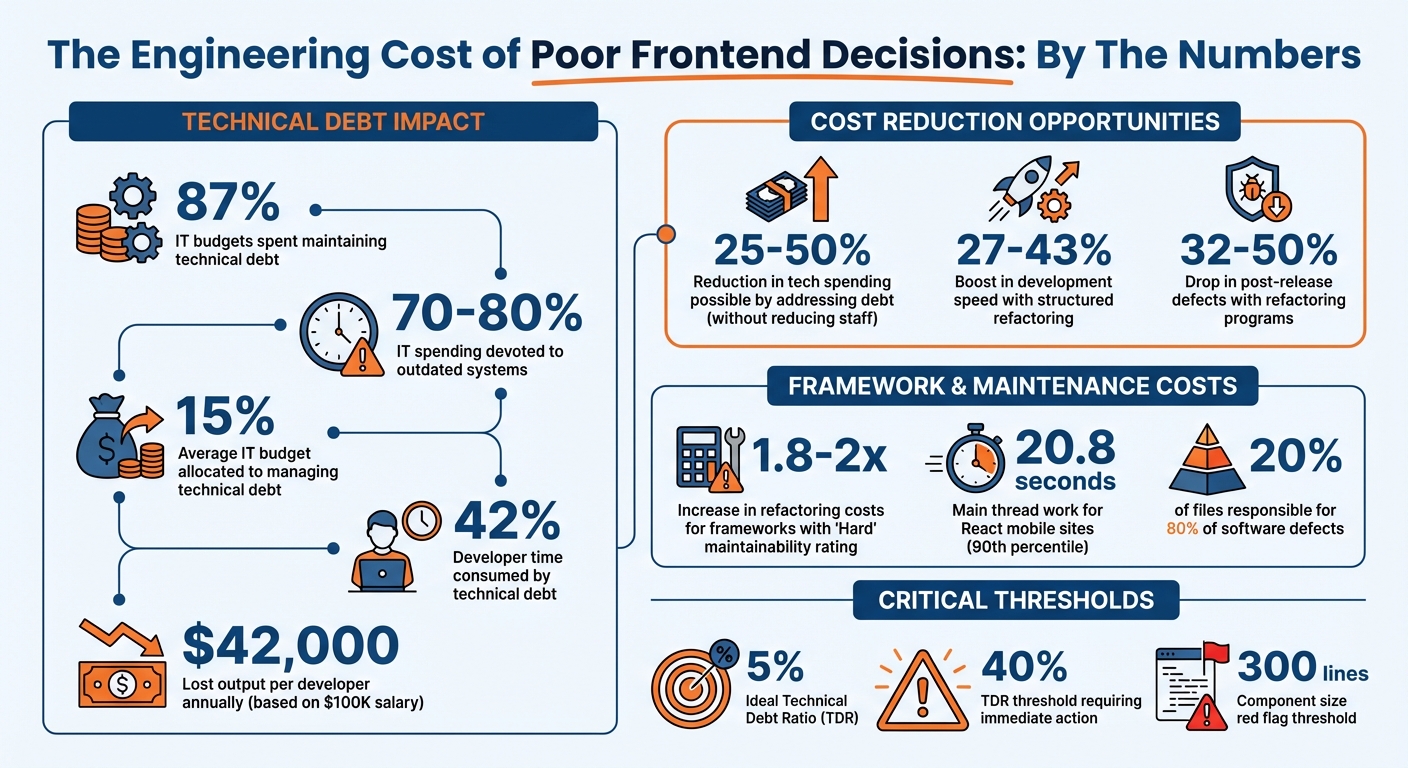
The True Cost of Frontend Technical Debt: Key Statistics
How Poor Frontend Decisions Increase Engineering Costs
Making hasty or shortsighted choices in frontend architecture can lead to slower development cycles, inflated infrastructure costs, and challenges in scaling teams. All of these issues can significantly strain budgets, delay timelines, and complicate the delivery of new features. Let’s break down how these problems drive up engineering costs.
Slower Development and Growing Technical Debt
When poorly designed components slow progress, delays become inevitable. Practices like code copy-pasting or creating unnecessarily complex components result in fragile codebases where even minor changes can cause major disruptions [6][1]. Tight coupling – such as embedding API calls directly in UI components or centralizing state management – makes unit testing and code reuse unnecessarily difficult [11].
Legacy technology dependencies exacerbate the problem. For instance, frameworks with a "Hard" rating for maintainability can increase refactoring costs by 1.8 to 2 times [2]. If key developers leave and documentation is scarce, teams may spend months trying to reverse-engineer past decisions instead of focusing on new features [10][2]. Organizations stuck with outdated frameworks, like AngularJS, often face a hefty "migration tax", requiring significant resources just to modernize their codebase [6].
Higher Infrastructure and Maintenance Expenses
Inefficient code and constant maintenance cycles can drive infrastructure costs through the roof. Studies show that teams may spend up to 87% of their budgets maintaining technical debt, with 70–80% of IT spending devoted to outdated systems [9][12].
Some common culprits include bloated JavaScript bundles that consume extra server resources, third-party plugins that fail after platform updates, and tightly coupled architectures where one failure can destabilize the entire system [9][12][13]. Without a solid suite of automated tests, teams often find themselves stuck in reactive debugging cycles, dedicating more time to fixing issues than building new features [9][10]. On average, companies allocate about 15% of their IT budgets to managing technical debt, but those that actively address it can cut overall tech spending by 25–50% without reducing staff [9].
Scaling Challenges and Expensive Onboarding
Expanding teams becomes a costly endeavor when poor frontend architecture complicates onboarding. Inconsistent or poorly structured codebases often devolve into "fragile spaghetti code", which reflects years of patchwork fixes rather than intentional design [1]. This lack of clarity forces new hires to rely heavily on prolonged mentoring sessions [1][10].
Overly complex components – such as files with thousands of lines of code handling unrelated features – can overwhelm newcomers [1]. Tightly coupled systems lead to frequent merge conflicts as teams collide on changes [1][14]. Additionally, the mental strain of managing data fetching, business logic, and styling within a single component further reduces productivity [7]. These inefficiencies slow down development, drive up hiring costs, and increase the risk of burnout, making it harder to retain talent.
sbb-itb-51b9a02
Common Frontend Mistakes That Cause Long-Term Problems
Knowing which technical decisions can lead to trouble is key to avoiding costly mistakes. Below, we break down common frontend pitfalls that can hurt scalability and drive up long-term costs.
Tightly Coupled Components and Messy State Management
Oversized components – those exceeding 300 lines and blending rendering, business logic, and side effects into one bloated unit – are a major red flag. These components are tough to test, reuse, and maintain [11]. They often grow unintentionally as developers tack on additional props or conditionals instead of refactoring. As Sandy Metz aptly put it:
"Existing code exerts a powerful influence. Its very presence argues that it is both correct and necessary" [15].
Mixing UI and business logic only makes things worse. For example, embedding API calls directly into UI components using useEffect can lead to state synchronization bugs and make testing unnecessarily complex.
Another common issue is misusing global state for simple UI tasks, like managing modal visibility or form inputs. This adds unnecessary cognitive load, slowing down development [11]. Martin Fowler explains the value of separating concerns:
"allows me to increase my focus by allowing me to think about the three topics relatively independently" [7].
Up next: how misusing frameworks can make these problems even harder to fix.
Framework Misuse and Vendor Lock-In
Just like tightly coupled components, over-reliance on framework-specific solutions can trap your architecture in outdated patterns. Embedding all business logic into framework-specific tools – like React hooks or Vue components – can create significant vendor lock-in. If you ever need to replace the view layer, you might face a complete rewrite [7]. Juntao Qiu from Thoughtworks highlights this issue:
"React, at its core, is a library (not a framework) that helps you build the user interface… it’s not fair to call them React applications, just as we wouldn’t call a Java EE application a JSP application" [7].
A smarter approach comes from Mixmax’s engineering team, who tackled this during their transition from Backbone.js in December 2022. Led by Brad Vogel, they ran an internal contest to build proof-of-concepts for their General Settings page using various state management tools like Recoil, Redux Toolkit + Saga, Redux Toolkit + Thunks, and Zustand. After evaluating each option for complexity, community support, and testing capabilities, they chose Redux + Saga for its scalability and debugging tools [16].
Over-dependence on third-party libraries can also cause trouble, increasing bundle size and introducing security or licensing risks [11]. Hardcoded configurations add to the problem by reducing portability and complicating deployments [11].
Large Bundle Sizes and Performance Problems
Poor bundle splitting can force users to download the entire application upfront, rather than loading code only when needed. Without lazy loading, Time to Interactive (TTI) gets delayed, frustrating users [11].
Ignoring Core Web Vitals can further hurt performance as your app grows. Features like tree shaking, code splitting, and lazy loading are essential to avoid performance bottlenecks. Without these optimizations, every new feature can drag down speed [4]. While modern frameworks offer built-in tools to address these challenges, they need to be implemented thoughtfully from the start. Fixing bundle inefficiencies later is far more challenging and can hinder the scalability we’ll discuss later.
How to Build Scalable and Maintainable Frontend Architectures
Avoiding bloated components, framework dependency issues, and performance problems starts with prioritizing architecture from the very beginning. A solid approach involves separating concerns into three layers: View (UI), Domain (business logic), and Data (API/storage) [7][18]. This structure allows you to modify logic without affecting the UI, and vice versa. As Martin Fowler puts it:
"On the whole I’ve found this to be an effective form of modularization for many applications… Its biggest advantage is that it allows me to increase my focus by allowing me to think about the three topics (i.e., view, model, data) relatively independently" [7].
Here’s how you can start building a frontend architecture that scales.
Build Modular, Component-Driven Systems
To tackle tight coupling issues, adopt a modular design. Keep components small and focused. Use pure components (presentational) that rely on props for data and emit events, while container components (smart) manage state and handle side effects [7][18]. For better testability, extract side effects into custom hooks [7].
Organize your codebase around business features rather than technical categories. For example, instead of separating /components and /hooks, create feature-based folders like /features/cart or /features/auth. This structure simplifies removing features – just delete the corresponding folder [8].
Use design tokens to standardize spacing and colors, and maintain a visual catalog of reusable components with tools like Storybook [17][4]. As Sachin Maurya explains:
"A design system is more than shared buttons. It’s the API of your UI layer" [17].
Choose Frameworks Carefully and Avoid Lock-In
To avoid framework dependency issues, treat tools like React or Vue as view libraries rather than the core of your application. Keep business logic separate by mapping API responses into plain JavaScript/TypeScript classes before passing them to components [7]. This prevents framework-specific code from spreading across your project.
Centralize API calls to reduce component dependency on specific endpoints [19]. Separate UI state (like modals or toggles) from server state (like API data). Use tools like React Query or SWR to manage server state efficiently with caching and background refetching [17]. For large applications, consider monorepo tools like Nx or Turborepo to manage shared packages while maintaining clear boundaries [8][19].
Prioritize Performance and Quality Testing
Performance should be baked into your architecture from the start to avoid issues like bloated bundle sizes [17]. Use route-based code splitting and feature-level lazy loading to ensure only necessary modules load initially [17][1]. Leverage modern build tools for tree-shaking to remove unused code, and favor libraries that support ES module formats [21]. As Sachin Maurya emphasizes:
"Performance isn’t an optimization step at the end – it’s an architectural decision upfront" [17].
For testing, focus on component tests rather than unit tests for UI. Component tests strike a balance between speed and a user-centric approach without the maintenance burden of end-to-end tests [20]. Tools like ESLint, Prettier, and TypeScript in strict mode can catch issues before they reach production [17][8]. Use end-to-end tests sparingly, targeting critical workflows like sign-up flows, as they can be costly to maintain [20]. Finally, integrate tests into your CI pipeline to enforce quality standards across the team [20][8].
When and How to Fix Existing Frontend Debt
Once you’ve identified rising engineering costs, the next step is figuring out how to tackle your existing frontend debt in a way that doesn’t derail ongoing development or production stability.
Even with the best intentions, technical debt accumulates. It can eat up 42% of a developer’s time and cost up to $42,000 in lost output per developer annually, assuming a $100,000 salary [22][25]. This makes addressing it wisely a top priority.
Identify and Prioritize Critical Frontend Debt
Start by auditing your codebase. Look for bottlenecks, outdated dependencies, and the areas that are hardest to modify [23]. A useful metric here is the Technical Debt Ratio (TDR), which estimates the cost of debt relative to the overall system. Ideally, this ratio should hover around 5% – if it climbs above 40%, it’s time to act [23][25].
Focus on the most impactful issues first. Research shows that about 20% of files in a repository are responsible for 80% of software defects [26]. Target modules that are frequently updated but are challenging to work with. Keeping a technical debt registry helps track these problem areas, document their consequences, and outline solutions [23][8]. This transparency ensures your team understands what needs fixing and why it matters.
Plan Gradual Refactoring
Avoid the urge to rewrite everything from scratch – it’s rarely the most efficient solution. Instead, take a phased approach and tackle the debt in smaller, manageable pieces. Dedicate 20% of each sprint to platform improvements and debt reduction [5][25]. Companies that follow structured refactoring programs often see a 27-43% boost in development speed and a 32-50% drop in post-release defects [25].
To minimize risk, use feature flags. This allows you to test refactored code internally before a full release, separating deployment from user impact [23]. You can also adopt migration strategies like running new modules alongside old ones or embedding legacy pages within modern frameworks. This incremental approach ensures user experience remains intact while you modernize [23][24].
Once you’ve made steady progress, consider bringing in outside expertise to speed things up.
Work with Expert Partners for Modernization
Sometimes, the scale of your technical debt or a lack of in-house expertise makes external help the best option. This is especially true if the original developers are unavailable, documentation is sparse, debt consumes more than 40% of developer capacity, or your system is over five years old and struggling to meet modern demands [25][2].
When choosing a partner, look for teams with dual-stack expertise – they should understand both your legacy system and the architecture you’re moving toward [25]. Depending on your needs, you can opt for advisory consulting (for strategy and planning) or staff augmentation (for hands-on execution) [25]. A good partner will lay out a phased approach and prioritize knowledge transfer, so your team can maintain the system after modernization [5][2].
For example, AlterSquare specializes in legacy modernization and architecture rescue, offering solutions like zero-downtime migrations, performance optimizations, and scalability improvements for companies dealing with aging codebases.
Costs for external help can vary significantly. Offshore teams may charge $30–$50 per hour, while U.S.-based agencies typically range from $100–$180 per hour [2]. While offshore options can save money, they may come with higher communication challenges. On the other hand, specialized agencies often deliver faster results with better quality [2]. Consider these trade-offs carefully when selecting a partner.
Conclusion
The frontend decisions you make today can either set your engineering team up for success or create challenges that linger for years. Making the wrong choices can feel like taking on technical debt – what seems like a quick fix now can lead to slower development cycles, frustrated developers, and higher infrastructure costs down the line. As Alex Vasylenko, CEO of The Frontend Company, aptly warns:
"We’ll refactor later – famous last words right before another feature gets delayed, another developer rage-quits, or your app crashes in production" [2].
Consider this: for mobile sites built with React, main thread work can take up to 20.8 seconds at the 90th percentile [3]. This kind of performance bottleneck doesn’t just frustrate users – it directly impacts conversion rates and your bottom line. The numbers make it clear: improving frontend practices is no longer optional.
The good news? You don’t need to start from scratch. Dedicate time during each sprint to focus on platform improvements. Embrace a modular, component-driven approach that allows for flexibility and change, rather than trying to predict every future need.
Whether you’re working on an MVP or maintaining a legacy system, the guiding principles remain the same: aim for modularity, set clear performance budgets, and address technical debt early. Postponing these efforts only increases costs and lowers team morale. By focusing on modular design and performance from the beginning, you can turn your frontend into a long-term asset rather than a liability.
FAQs
What are common frontend mistakes that cause technical debt?
The most common frontend mistakes that pile up into technical debt often start with quick fixes made under tight deadlines. These rushed solutions might work for the moment, but they usually skip proper testing, documentation, or refactoring. Over time, these shortcuts can make maintenance and scalability a nightmare.
Another major culprit is poor architectural choices. For example, building overly complex components, ignoring modular design principles, or relying too heavily on global state can lead to messy, hard-to-manage code. On top of that, frequently switching frameworks or libraries without a clear migration plan can leave behind inconsistent code and abandoned pieces of functionality.
Other common issues include inconsistent coding standards, minimal documentation, and skipping automated testing. These practices make future updates riskier and far more time-consuming. Tackling these problems early on – by sticking to disciplined coding practices, conducting thorough code reviews, and using automated tools – can go a long way in reducing technical debt and ensuring your frontend architecture stands the test of time.
How does modular design help avoid scalability issues in frontend development?
Modular design breaks a frontend codebase into independent, self-contained modules, each handling its own UI, state, and styling. This setup allows modules to be developed, tested, and deployed separately, minimizing the chance of changes in one area impacting the rest of the application. As a result, the codebase becomes easier to manage and adapt as the product evolves.
By keeping these modules loosely connected, teams can work on various parts of the application simultaneously with minimal coordination. This reduces bottlenecks, limits merge conflicts, and allows for smoother workflows. Plus, incremental updates become much simpler – new features or redesigns can be rolled out by tweaking specific modules rather than reworking the entire codebase. This approach helps control technical debt and supports quick, efficient release cycles.
When combined with smart architectural patterns, modular design ensures that the frontend remains scalable, easy to maintain, and resilient – even as the product grows more complex and the user base expands.
How can I effectively manage and reduce frontend technical debt?
To tackle frontend technical debt effectively, begin by auditing your codebase to pinpoint problem areas. Look for outdated libraries, components that are overly dependent on each other, or repeated code. Once identified, rank these issues based on their business impact and the effort needed to resolve them. Make it a habit to allocate time during each sprint to address these concerns incrementally, treating refactoring as a key priority rather than an afterthought.
To prevent new technical debt, implement practices such as regular code reviews, enforcing consistent linting rules, and setting up automated testing – covering unit, integration, and visual regression tests. Over time, focus on breaking down legacy code into smaller, reusable modules or components, following a well-defined architectural plan. Ensure these modules are thoroughly documented to simplify onboarding for new team members and avoid duplicating efforts in the future. By combining disciplined workflows, steady improvements, and forward-thinking strategies, you can gradually reduce technical debt while keeping up development speed and improving the overall user experience.






Leave a Reply