
Frontend development is evolving fast with AI integration. Adding AI to products impacts how we design, manage, and optimize frontends. Here’s a quick breakdown of the major shifts:
- New Responsibilities for Frontend: AI models are now part of the browser, requiring frontends to handle large model downloads (e.g., 1.3GB models vs. typical 2.2MB web pages) and real-time personalization.
- State Management Overhaul: State now splits into two layers:
- AI State: Feeds context to the AI model.
- UI State: Manages what users see.
- Dynamic Design Systems: Components need strict APIs and metadata to ensure AI-driven personalization aligns with brand guidelines.
- Performance Challenges: Lazy loading, caching, and edge computing are essential to keep AI-enhanced UIs fast and responsive.
- Security Needs: AI interactions require strict input validation, monitoring, and middleware to prevent errors and misuse.
- Micro-Frontends: Breaking down frontends into smaller, independently scalable units ensures AI features don’t slow down the entire app.
AI changes frontend architecture by making clarity and modularity non-negotiable. Developers must rethink everything from state management to security to meet these demands.
State of the Art of AI Tools in Micro-Frontend Architectures • Luca Mezzalira • GOTO 2025
How Design Systems Change for AI Personalization
Traditional design systems were all about consistency. But with AI in the mix, the game changes – design now needs to be dynamic and context-aware. Your design system must support controls that adapt based on user intent and interfaces that shift in real time, guided by behavioral patterns [6]. The focus moves from static grids and pixel-perfect layouts to systems built for flexibility, context, and memory.
A major shift here is treating your design system as a machine-readable contract, not just a visual guide. Nelson Michael from LogRocket explains it well:
"Design systems aren’t just for humans anymore. They’re contracts that AI tools can validate against" [1].
This means components need strict, typed APIs – think TypeScript interfaces with clearly defined props and variants. These type definitions act as guardrails, ensuring AI-generated or selected components stick to your brand’s patterns rather than introducing rogue JSX that could break layouts or brand consistency.
Building Components That Adapt in Real Time
Modern component libraries need to do more than look good – they must adapt on the fly. This includes reordering content blocks, tweaking CTA text, or adjusting styles in real time [7]. Instead of relying on raw code generation, you can use a pre-built, AI-driven component registry (RUG). With RUG, you maintain a library of brand-approved components, and the AI selects and customizes these elements based on user context. This ensures both security and brand consistency while still offering personalized experiences [10].
To pull this off, machine-readable documentation is essential. Tools like Storybook transform your components into "living" documentation, detailing valid props, supported states, and usage patterns [1]. For example, Brad Frost demonstrated how training an LLM on a design system’s code sped up component creation by up to 90% [8]. Adding metadata – like the purpose, audience, and content type of each component – helps AI orchestrators pick the right elements for every situation [10].
This adaptability naturally extends into dynamic theming and branding.
Using AI to Adjust Themes and Branding
Building on adaptive components, theming now requires real-time flexibility. AI-driven theming goes far beyond simple dark mode toggles. Today’s interfaces combine natural language input with traditional GUI elements [6]. For instance, a user might say, "Make this image feel friendlier", and the AI would adjust parameters like brightness and color temperature instantly. To make this work, your theming system must offer granular controls that still uphold brand guidelines.
For apps running on AI platforms like ChatGPT, host-injected APIs (like window.openai) become crucial. These APIs allow your app to react to changes in display mode, theme preferences, or user locale [11]. The trick is keeping your application state organized: let AI State handle LLM context while UI State manages component rendering [3]. This separation ensures AI can adjust themes dynamically without unnecessary re-renders or disruptions. As researchers Kate Moran and Sarah Gibbons from the Nielsen Norman Group point out, this approach enables personalization at scales once thought impossible – like customizing interfaces for 190 million annual airline passengers [9].
State Management Changes for AI Workflows
When integrating AI into your frontend, traditional state management approaches often don’t cut it anymore. The challenge lies in handling continuous data streams, multi-step workflows, and incremental AI responses. To address this, your architecture needs to split into two layers: AI State and UI State.
- AI State is essentially a serializable JSON proxy that feeds context to your large language model (LLM) on the server.
- UI State is the client-side state rendered to users.
This separation is key to effectively managing AI response streams and ensuring smoother workflows [3].
For transporting data, Server-Sent Events (SSE) are your best bet for simple token streaming. They’re low in complexity and come with built-in reconnection capabilities [12]. On the other hand, WebSockets are better suited for more complex, bidirectional scenarios like real-time collaboration or telemetry. One critical tip: don’t stream raw text. Instead, use structured protocols like NDJSON to send typed events (e.g., token, tool_start, usage, error) so the UI knows exactly what to render [12][4].
Piyush from Proagenticworkflows.ai offers a clear benchmark:
"TTFT < 300–700 ms feels snappy" [12].
To hit that Time-to-First-Token (TTFT) target, batch tokens and update the UI every 30–60 ms or after 20–60 characters. This prevents reflow storms and keeps the interface feeling quick and responsive [12].
Managing AI Response Streams
When managing live streaming responses, reactive stores like Zustand or Redux can help. For server-side caching of completed responses, tools like TanStack Query come in handy [12]. A smooth transition from streaming (ephemeral) state to cached (durable) state is crucial. Also, always implement AbortController so users can stop generation instantly if needed [12].
For accessibility, use aria-live="polite" in streaming containers. This ensures screen readers announce updates incrementally without overwhelming users [12].
If you’re building embedded AI widgets (like ChatGPT-style interfaces), organize your state thoughtfully:
- Authoritative business data belongs on the server.
- Ephemeral UI state (e.g., expanded panels or selected rows) should stay widget-scoped.
- Durable cross-session state (like saved filters or preferences) should be stored in backend storage [13].
Keeping payloads under 4,000 tokens is another way to maintain performance [11]. With stable streaming state management in place, you can further enhance responsiveness with optimistic UI updates.
Optimistic UI Updates with AI Predictions
Optimistic UI updates allow for instant feedback when users take action, even as the backend processes the AI response. This creates the impression of speed and responsiveness. Once the AI finishes its work, the UI reconciles with the authoritative server snapshot [13].
To implement this, use hooks like useUIState or useWidgetState to keep local changes synced with background processes [13]. If the AI prediction fails or an error occurs, ensure the UI reverts to its last stable state. This avoids leaving users with incomplete or broken interfaces.
Data Pipelines for AI-Powered Products
Managing the complexities of AI state requires well-designed data pipelines, which are crucial for delivering real-time, distributed AI experiences. Traditional REST APIs simply can’t handle the continuous data flows modern AI workloads demand. Instead, protocols like Server-Sent Events (SSE) for simple token streaming or WebSockets for more complex, bidirectional exchanges are better suited. These protocols should integrate seamlessly with independent microservices for tasks like data ingestion and model retrieval [12][5].
AI pipelines today are increasingly built as collections of independent microservices. Tasks such as data ingestion, model retrieval (e.g., retrieval-augmented generation), and summarization are now modular, reusable components. AWS Prescriptive Guidance highlights this shift:
"The true power of a microservices architecture lies in decoupling and reducing the dependencies between components so they can operate and evolve independently" [5].
Another key development is the rise of AI Gateways, which centralize model routing and manage load balancing across different regions. These gateways often include "spillover" strategies, redirecting excess traffic to elastic endpoints during demand surges [5]. Next, let’s explore how real-time APIs and advanced caching practices strengthen these AI data pipelines.
Moving to Real-Time APIs
For AI-driven frontends to deliver a responsive experience, strict technical benchmarks must be met. For instance, achieving a Time-to-First-Token (TTFT) of 300–700 ms is critical for maintaining that "snappy" feel. In voice interactions, Text-to-Speech latency must remain under 250 ms [12][14]. Deploying streaming endpoints closer to users – at the edge – can significantly reduce latency. Using structured formats like NDJSON ensures clear event definitions [12].
If you’re leveraging NGINX as a proxy, there are specific configurations to optimize real-time APIs:
- Set the
X-Accel-Buffering: noheader to prevent buffering of SSE streams. - Increase idle timeouts to 60–120 seconds for long-running AI processes [12].
These adjustments can make a noticeable difference in responsiveness, especially for real-time applications.
Caching Strategies for AI Features
Caching in AI systems calls for smarter, semantic caching techniques. Unlike traditional caching, which relies on exact matches, semantic caching stores model outputs based on embedding similarity. This enables the system to serve cached responses for queries that are similar to previous ones, cutting down both latency and computational overhead [14].
For client-side models, the Cache API is a must for fast and explicit caching. Thomas Steiner from Google’s Chrome team emphasizes its importance:
"The Chrome storage team recommends the Cache API for optimal performance, to ensure quick access to AI models, reducing load times, and improving responsiveness" [15].
For server-side caching, configure headers like Cache-Control: public, max-age=31536000, immutable. This allows shared caches and CDNs to store models for extended periods. For large downloads, consider chunked fetching using libraries like fetch-in-chunks, which not only handles unstable connections more effectively but also provides progress tracking [2][15].
These strategies collectively ensure that your AI-powered product remains fast, efficient, and ready to handle complex workloads.
Performance Optimization for AI-Enhanced UIs
AI models bring a unique set of challenges, particularly when it comes to their size. To put things into perspective, the average web page is about 2.2 MB, but a smaller language model like Gemma 2B can be a staggering 1.35 GB – more than 100 times larger[2]. This massive size changes the game for performance optimization. Treating AI models like standard JavaScript bundles can lead to slow load times and sluggish user interfaces.
The key is to load AI features only when there’s a clear indication that the user will need them. Smaller, task-specific models can help strike a balance. For instance, BudouX, used for character breaking, is a compact 9.4 KB, while MediaPipe’s language detection model is 315 KB[2]. For larger models, aim to keep downloads under 5 MB unless absolutely necessary, and consider alerting users if a larger download is required.
Lazy Loading AI Models
To keep things efficient, download AI models only when there’s a strong likelihood that the user will interact with the feature. For example, in an AI-powered type-ahead feature, you could delay downloading the model until the user begins typing, rather than loading it upfront[2]. This approach keeps the initial page load lighter and reduces mobile data consumption.
Caching plays a crucial role in optimizing performance. Thomas Steiner from Chrome’s team advises:
"The Chrome storage team recommends the Cache API for optimal performance, to ensure quick access to AI models, reducing load times, and improving responsiveness."[15]
The Cache API is particularly effective for large files since it avoids the slow serialization and deserialization processes associated with IndexedDB. For especially large models, tools like fetch-in-chunks can help by splitting downloads into parallel streams, which also makes handling unstable connections easier[2]. Additionally, using Web Workers to manage model preparation and inference ensures the UI remains responsive during heavy computations[2].
These strategies not only improve load times but also set the groundwork for efficient computation.
Edge Computing for AI Inference
Running AI inference directly on the user’s device – commonly referred to as edge computing – can significantly reduce latency and lower server costs. Several companies already leverage this approach. For instance, Adobe Photoshop uses a Conv2D model variant for intelligent object selection, Google Meet employs an optimized MobileNetV3-small model for real-time background blurring, and Tokopedia utilizes MediaPipeFaceDetector-TFJS for on-device face detection[15].
Before implementing client-side inference, check if the device supports WebGPU. With WebGPU, models can run on the GPU, ensuring the UI remains smooth. If WebGPU isn’t available, a WebAssembly fallback can be used, though it relies on the CPU and may be slower[2]. Tools like Navigator.deviceMemory and the Compute Pressure API can help you gauge whether a device is capable of handling the AI workload. It’s also important to design fallback options so core features remain functional, even if the model fails to load[3,30].
sbb-itb-51b9a02
Client-Side AI Frameworks
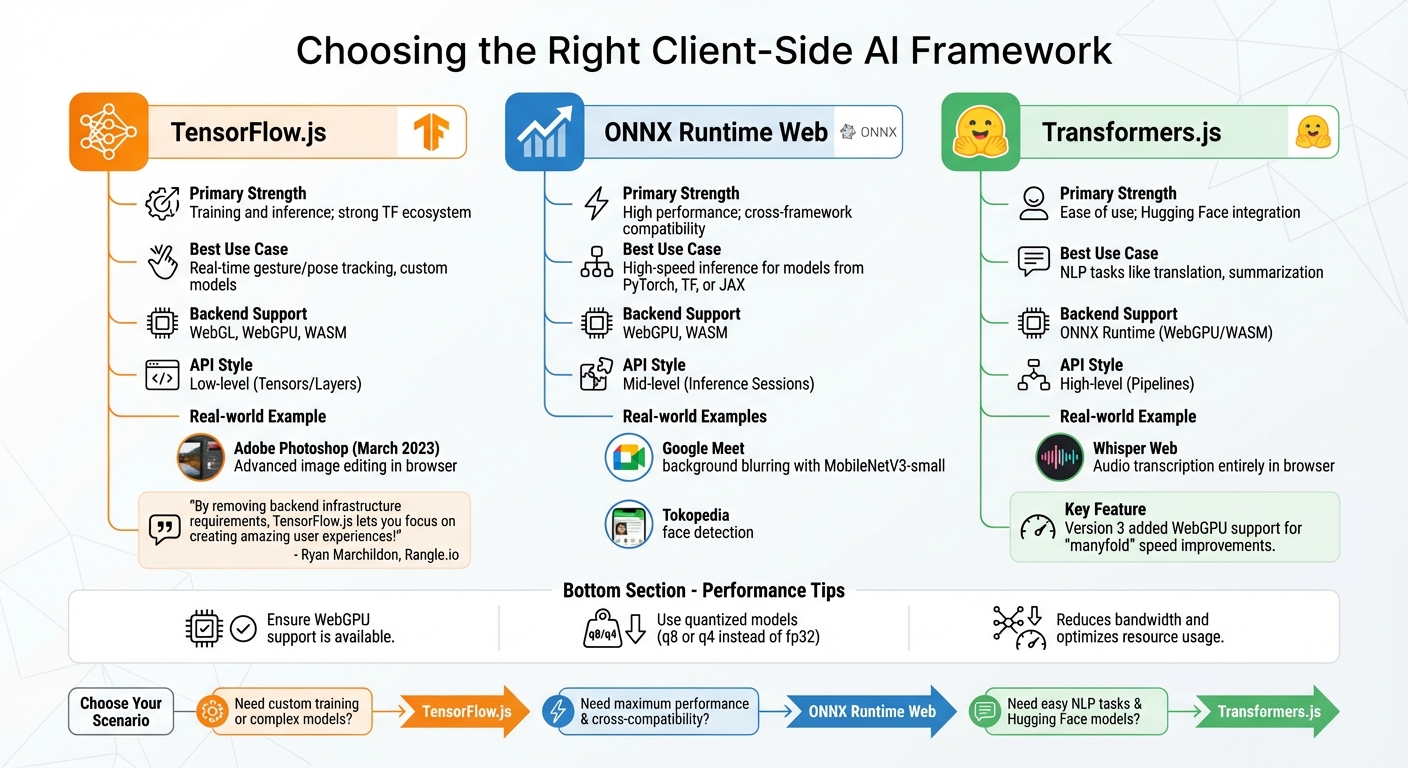
Client-Side AI Framework Comparison: TensorFlow.js vs ONNX Runtime Web vs Transformers.js
When running AI inference directly in the browser, the choice of framework plays a critical role in performance and functionality. Popular options include TensorFlow.js, ONNX Runtime Web, and Transformers.js – each designed with distinct strengths to suit different project requirements. These frameworks align with broader considerations like state management and security, ensuring a seamless integration into your AI-powered frontend.
TensorFlow.js stands out as the most established option, supporting both training and inference in the browser or Node.js environments [18][19]. For instance, in March 2023, Adobe leveraged TensorFlow.js to introduce advanced image editing capabilities in the browser-based version of Photoshop. This innovation enabled intricate editing tasks without relying on server-side processing [19]. Ryan Marchildon, an AI developer at Rangle.io, highlights its benefits:
"By removing backend infrastructure requirements, TensorFlow.js lets you focus on creating amazing user experiences!" [22]
ONNX Runtime Web, on the other hand, is optimized for high-performance inference and compatibility across frameworks. It adapts to the device’s capabilities by utilizing WebGPU, WebGL, or WebAssembly (WASM), making it an excellent choice when speed is paramount [20][21].
For natural language processing (NLP), Transformers.js is a top pick, offering seamless integration with Hugging Face‘s model hub. Hugging Face describes it as:
"Transformers.js is designed to be functionally equivalent to Hugging Face’s transformers python library, meaning you can run the same pretrained models using a very similar API." [20]
Powered by ONNX Runtime Web, it simplifies tasks like text generation, translation, and sentiment analysis through its high-level "pipeline" API. A notable example is Whisper Web, which uses Transformers.js to transcribe audio into text entirely within the browser, eliminating the need for server-side interaction [20]. With the release of version 3, WebGPU support was added, significantly enhancing on-device inference speed. Maud Nalpas from Chrome Developer Relations notes that this update "can speed up on-device inference manyfold" [23].
Comparing TensorFlow.js, ONNX Runtime Web, and Transformers.js
The decision between these frameworks depends on your specific use case and the models you intend to work with. TensorFlow.js is ideal for tasks requiring model training or staying within the TensorFlow ecosystem. ONNX Runtime Web excels in production environments where speed and compatibility across diverse model formats are critical. Meanwhile, Transformers.js simplifies NLP workflows and integrates effortlessly with Hugging Face models.
Here’s a quick comparison to help you decide:
| Framework | Primary Strength | Best Use Case | Backend Support | API Style |
|---|---|---|---|---|
| TensorFlow.js | Training and inference; strong TF ecosystem | Real-time gesture/pose tracking, custom models | WebGL, WebGPU, WASM | Low-level (Tensors/Layers) |
| ONNX Runtime Web | High performance; cross-framework compatibility | High-speed inference for models from PyTorch, TF, or JAX | WebGPU, WASM | Mid-level (Inference Sessions) |
| Transformers.js | Ease of use; Hugging Face integration | NLP tasks like translation, summarization | ONNX Runtime (WebGPU/WASM) | High-level (Pipelines) |
To maximize performance, ensure WebGPU support is available and use quantized models (e.g., q8 or q4 instead of fp32) to reduce bandwidth and optimize resource usage [20]. Selecting the right framework is a key step in adapting your frontend to handle the demands of AI-driven workflows effectively.
Security and Observability in AI Frontends
Integrating AI into your frontend brings unique challenges, including the Confused Deputy Problem, where an AI with elevated permissions can be manipulated into performing unauthorized actions [25]. This means your security measures need to go beyond standard defenses like XSS and CSRF protections.
It’s crucial to understand that system prompts are not a substitute for security controls. As noted in Microsoft’s AI Playbook, prompts should never be treated as secrets or relied upon for securing systems [24]. Instead, implement strict input filtering before data reaches the AI. This can involve code-based checks or lightweight classification models like BERT to detect malicious patterns [25]. Libraries such as Zod (for Node.js) or Pydantic (for Python) are excellent tools for schema validation. They ensure that both tool parameters and AI outputs meet strict requirements, rejecting malformed or suspicious requests before they’re executed [25][1]. By enforcing these measures, you can secure your AI interactions with more confidence.
AI Prompt Validation and Sanitization
When handling AI inputs and outputs, treat them as untrusted data. Centralize validation, logging, and authorization in middleware to maintain control [1]. Tools like Microsoft Presidio can help scrub sensitive information (like PII) to avoid compliance issues with GDPR or CCPA [24][25].
To prevent code injection attacks – whether through JavaScript or Markdown – encode all model responses [24]. Additionally, if your AI processes external content, such as webpage summaries, sanitize that content thoroughly. Indirect injection attacks, where hidden instructions in the data can trigger unauthorized actions, are a real risk [25]. Adopting a least-privilege approach is another vital step. For example, assume the large language model (LLM) could be compromised: restrict database permissions to read-only by default and limit file system access to specific directories [25]. These precautions create a safer environment for AI operations.
Beyond validation and sanitization, maintaining continuous monitoring is equally critical as AI becomes more integrated into your systems.
Monitoring AI Model Interactions
Machine-generated code introduces new observability challenges. To address these, structured logging, distributed tracing, and consistent error handling are non-negotiable [1]. Keep an eye on AI-specific metrics like Time to First Token (TTFT) and Tokens Per Second (TPS) to identify performance issues or recursive loops that might lead to service disruptions [17]. Companies that have invested in specialized observability platforms report up to an 80% reduction in downtime for both data and AI systems [26].
Leverage tools like OpenTelemetry to capture telemetry data that tracks every step an AI agent takes. For better traceability, use per-widget session IDs to link multiple tool calls within the same component instance [1]. Monitoring token usage – such as "Memory per Token" – is also critical to prevent out-of-memory crashes during lengthy conversations.
For high-risk actions, like financial transactions or data deletions, implement a human-in-the-loop approach. This means requiring explicit human approval before the AI takes action autonomously [24][25]. This additional layer of oversight acts as a safeguard when AI reasoning falters or becomes compromised. Together, these robust security and monitoring strategies ensure your AI systems remain reliable and secure, complementing the dynamic frontend architectures discussed earlier.
Micro-Frontends for Scalable AI Architecture
Traditional monolithic frontends often falter when handling AI-driven features like chatbots, recommendation engines, or image processing tools. These features demand independent scaling, which monoliths simply can’t provide. Enter micro-frontends: a way to treat each AI-powered feature as its own self-contained unit. Each unit can be developed, deployed, and scaled separately, ensuring that high traffic or heavy processing in one component doesn’t bog down the entire UI.
Instead of relying on a single, massive codebase, micro-frontends break the UI into smaller, independent applications. Each application is managed by a dedicated team. For example, your recommendation widget might use TensorFlow.js, while your main dashboard runs on React. The beauty of this setup? Each component scales independently based on demand.
By using bounded contexts, each micro-frontend handles its own data, state, and logic. This isolation means that if one AI-powered feature fails, it won’t take down the rest of your application.
To keep performance smooth, lazy loading ensures heavy AI assets are only downloaded when needed. You can also wrap each AI module in error boundaries and use React Suspense, so a failure in one component doesn’t crash the entire app.
Module Federation for AI Components
Building on the micro-frontend approach, Module Federation takes things a step further by optimizing shared AI components. It allows for runtime code sharing between independent builds, which reduces redundancy. Instead of each team bundling its own copy of TensorFlow.js or Transformers.js, you can configure these libraries as singletons in your shared setup. This minimizes bundle sizes and avoids runtime conflicts.
The architecture typically follows a Host-Remote pattern. The "Shell" (Host) handles routing and authentication, while AI features live in "Remotes" that are dynamically loaded. For instance, you can load certain AI features only when a user interacts with them. To avoid dependency conflicts, strict versioning for core AI libraries is crucial.
"Module Federation, introduced in Webpack 5, enables JavaScript applications to share and load code from each other at runtime… it’s a design pattern for true runtime integration." – Sudhir Mangla, Architect
For heavy AI computations, offload inference to Web Workers within the federated module. This prevents the main UI thread from getting blocked. If a large model download (e.g., over 10 MB) is required, give users a heads-up with a warning or progress indicator. On mobile devices, use the Cache API to store models locally after the first download.
To maintain consistency across teams, establish naming conventions for CSS classes, events, and local storage keys (e.g., prefix them with "ai-chat-"). Use skeleton screens to reserve space and prevent layout shifts during model inference. Finally, keep a guidelines.md file at the root of your repository. This serves as a contract for both human developers and AI coding agents, ensuring everyone adheres to the same patterns.
These scalable and modular architectures make it easier to integrate advanced AI capabilities into your product without compromising performance or stability.
Conclusion
Bringing AI into your frontend changes the game in how you design, scale, and secure your systems. Every piece of your stack – whether it’s a design system, state manager, or micro-frontend – needs to adapt to meet the new challenges AI introduces.
The stakes are higher than ever. As Nelson Michael, Staff Frontend Engineer at LogRocket, puts it: "AI doesn’t reduce the need for good architecture. It raises the stakes. Implicit conventions and ‘we’ll clean this up later’ technical debt used to be tolerable. Now they’re liabilities." [1] Your architecture must now serve two masters: human developers and AI agents that interact with your codebase.
To keep up, decouple your business logic from UI components and centralize critical functions like security, logging, and validation in middleware. This prevents discrepancies and ensures consistency. Use the Cache API to store models locally, offload inference tasks to Web Workers, and treat all AI-generated output as if it were untrusted user input – always validate it.
As AI reshapes architecture, attention must also shift to performance and security. While 92% of developers are using AI coding tools, only 36% have managed to fully integrate them into their daily workflows as of early 2025 [16]. Keeping model sizes around 5MB has become a practical target, but anything larger requires careful optimization [2].
The evolution from monolithic AI setups to more modular systems – using AI gateways, orchestration services, and microservices – is now a necessity for teams working at scale [5]. This modular approach not only helps systems scale but also adds an extra layer of protection against AI-related risks. Your frontend needs to handle real-time streaming, manage unpredictable latency, and provide visibility into complex, multi-step workflows. Nail these foundational elements now, and you’ll be ready to scale as AI continues to evolve at breakneck speed.
FAQs
How does integrating AI impact frontend performance optimization?
Integrating AI into frontend architecture brings both hurdles and opportunities when it comes to optimizing performance. AI-powered features often involve managing larger files and resources, like models and datasets, which can put extra strain on the browser and slow down page loading times. To tackle this, developers can implement strategies like using smaller, optimized models, caching frequently used data, and applying lazy loading to ensure smooth and efficient performance.
Another key consideration is how to handle inference processes effectively, whether they run on the client side or the server side. Tools such as TensorFlow.js allow models to operate directly in the browser, which can cut down on latency and deliver a better user experience. That said, this approach can introduce added complexity to state management and data flow pipelines. Striking the right balance between performance, scalability, and security is essential, and fallback mechanisms should always be in place to ensure the application remains functional under any circumstances.
In essence, AI integration shifts the frontend’s role from being purely a visual interface to becoming an active participant in data processing. This evolution calls for well-thought-out architectural changes to maintain a seamless and user-friendly experience.
What security factors should you consider when adding AI to frontend architecture?
When incorporating AI into frontend systems, security must be a top priority. It’s crucial to protect user data, maintain the integrity of your system, and prevent potential misuse. This involves addressing vulnerabilities in AI models and data pipelines, such as injection attacks or unauthorized access to sensitive information.
To achieve this, implement strong authentication and authorization mechanisms. These measures ensure that only approved users and processes can access AI features, reducing the risk of exploitation.
For those utilizing client-side AI tools like TensorFlow.js, it’s equally important to prioritize user privacy. Make sure any locally processed data is handled securely, avoiding vulnerabilities or violations of privacy standards. On top of that, safeguard AI models by securing their files, preventing tampering, and managing updates through secure channels.
By taking a well-rounded approach to security, you can minimize risks and provide users with a safe, AI-driven experience.
How do design systems enable AI-powered personalization?
Design systems lay the groundwork for creating user interfaces that are consistent and flexible – key factors when it comes to AI-powered personalization. By standardizing elements like buttons, input fields, and layouts, teams can quickly roll out personalized features while keeping the design cohesive and the user experience smooth.
These systems often include guidelines for adaptive user experiences, ensuring that AI-driven features – like personalized recommendations or dynamic content – blend seamlessly with the overall design. This makes the personalization process feel natural, intuitive, and easy to scale.
When AI is integrated into design systems, it enhances collaboration between designers and developers. The result? Faster iterations and a smoother rollout of personalized experiences, all while ensuring performance and usability remain top-notch.





Leave a Reply