

When you’re juggling limited resources, prioritizing bugs effectively can mean the difference between a smooth product release and frustrated users. Here’s the key takeaway: Focus on fixing bugs that impact critical workflows or revenue first. These include issues like crashes, payment failures, or broken sign-up flows. Minor visual glitches? They can wait.
Here’s how to make it happen:
- Classify bugs by severity (e.g., P0 for critical issues like crashes, P3 for cosmetic problems).
- Assign priorities based on user impact, business goals, and urgency.
- Use frameworks like MoSCoW, RICE, or Value vs Effort to rank bugs objectively.
- Establish a triage process: review bugs regularly, assign ownership, and document decisions.
- Leverage tools like Jira or Linear for tracking and communication platforms like Slack for updates.
How to manage defects (bugs) in an agile workflow?
Setting Bug Severity and Priority Levels
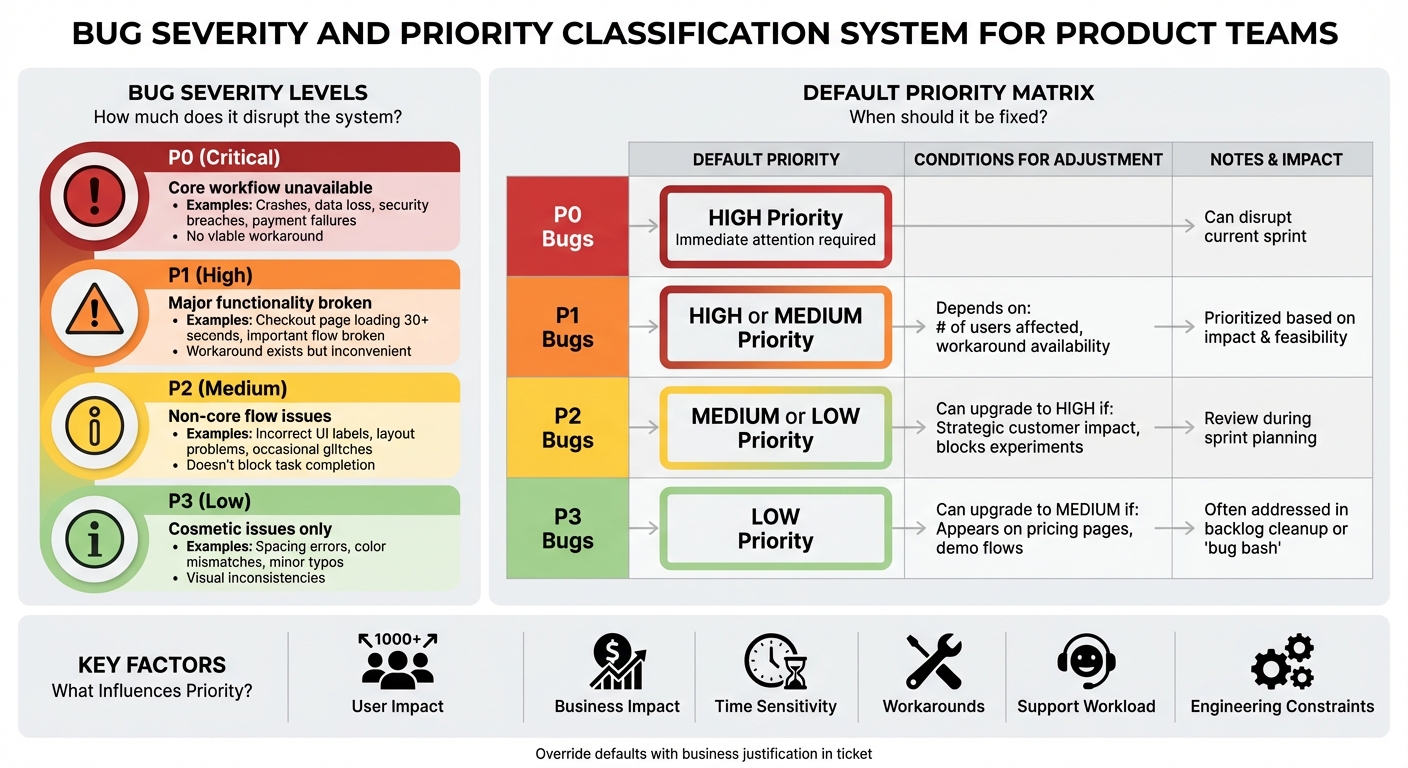
Bug Severity and Priority Classification Framework
Severity measures how much a bug disrupts your system or user experience. For instance, crashes, data loss, or a completely unusable core feature fall into this category. Priority, on the other hand, reflects how urgently the issue needs to be fixed, based on factors like business goals, the number of users affected, and timing constraints [2][3]. Using both metrics is especially important for startups. Some bugs may be technically severe but only impact a small group of users (high severity, low priority), while others might seem minor but affect a critical customer, launch, or revenue stream (low severity, high priority) [2][3]. Balancing these factors helps you avoid overreacting to rare edge cases while ensuring you address issues that could block revenue, growth experiments, or important demos. To get started, establish clear severity levels to guide your team’s bug classification process.
How to Define Severity Levels
A straightforward four-level severity scale can help keep your product, engineering, and support teams on the same page:
- P0 (Critical): Your app or a core workflow is unavailable for a significant portion of users. Examples include repeated crashes, data loss, security breaches, payment failures, or any issue with no viable workaround [3].
- P1 (High): Major functionality is broken in an important flow, or there’s significant performance degradation, like a checkout page taking over 30 seconds to load during peak U.S. hours. There may be a workaround, but it’s inconvenient or risky [3][7].
- P2 (Medium): Issues in non-core flows, occasional glitches, incorrect UI labels, or layout problems that confuse users but don’t block task completion [1][3].
- P3 (Low): Cosmetic issues such as slight spacing errors, color mismatches, minor typos (not on critical pages like pricing or checkout), or small visual inconsistencies across devices [1].
For example, in a SaaS startup catering to U.S. customers and billing in USD, a P0 bug could be a checkout API returning 500 errors for 40% of users during peak hours, preventing credit card payments. A P1 might involve a subscription upgrade flow failing when adding more than 50 seats, impacting mid-market clients. A P2 could be an inaccurate notification badge count that doesn’t affect functionality. A P3 example might be a misaligned button on a profile page when viewed on a 4K monitor or a typo in a tooltip. Documenting these definitions in your bug template ensures consistent classifications across your team [4].
What Influences Priority Decisions
Prioritizing bugs involves considering several factors: user impact (how many are affected, which customer segment, and their location), business impact (revenue risk, effect on key metrics, alignment with goals), time sensitivity (upcoming launches or deadlines), availability of workarounds, current support workload, and engineering constraints (dependencies, required expertise, and opportunity costs) [2][3].
For instance, a P2 bug affecting a top enterprise customer’s billing might be assigned High priority, even over a P1 bug that impacts only a few free users. To streamline this process, create a default matrix for setting expectations while allowing flexibility:
- P0 bugs: Default to High priority and require immediate attention, even if it disrupts the current sprint [7].
- P1 bugs: Typically High or Medium priority, depending on the number of users affected and the availability of a workaround.
- P2 bugs: Usually Medium or Low priority, but they can be upgraded to High if they impact strategic customers or block active experiments.
- P3 bugs: Default to Low priority, though they may be raised to Medium if they appear in highly visible areas like pricing pages or marketing/demo flows [2][3].
If someone overrides the default – for example, upgrading a P2 to High – include a brief business reason in the ticket, such as: "This affects a $50,000/month customer and poses a risk of immediate churn." This approach maintains structure while allowing room for business context, setting the stage for an organized and effective bug triage process.
Bug Prioritization Frameworks
Once you’ve established severity and priority for bugs, using a framework can help you rank them more objectively. Frameworks reduce subjective decisions and create a shared language for prioritizing tasks during sprints [2][4]. For startups, it’s a good idea to adopt a framework once you start seeing a steady inflow of bugs – usually after launching your MVP – and feel the tension between fixing issues and building new features [4]. Even lightweight frameworks can greatly improve focus and speed, particularly for distributed teams.
Three popular frameworks to consider are MoSCoW, RICE, and Value vs Effort. MoSCoW and Value vs Effort are quicker to adopt, while RICE becomes more useful as you gather data on usage, impact, and effort estimates. Many teams use a mix of these frameworks – for example, applying MoSCoW for sprint planning, RICE for roadmap decisions, and Value vs Effort for visual discussions with stakeholders [2][3][5]. These methods align well with severity levels, helping teams tackle high-impact bugs efficiently.
MoSCoW Method
The MoSCoW method organizes bugs into four categories: Must-Have, Should-Have, Could-Have, and Won’t-Have. This system ensures focus on the most disruptive issues. To adapt it for bug triage, define specific rules for each category and document them in your guide and issue tracker [2][4]. For a U.S.-based SaaS product, these categories might look like this:
- Must-Have (M): Bugs that block payments, sign-ups/logins, core workflows, or cause data loss, security breaches, or widespread outages. These require immediate attention and should be fixed in the current or next sprint [2][3].
- Should-Have (S): High-impact issues with available workarounds, like incorrect tax calculations in rare cases or non-critical performance slowdowns. Plan to address these in upcoming sprints.
- Could-Have (C): Minor issues, such as cosmetic UI glitches or rare edge-case errors that don’t block users. Fix these when extra capacity is available.
- Won’t-Have (W): Low-priority or outdated defects, such as bugs in soon-to-be-deprecated modules or those affecting less than 1% of low-value traffic. These can be closed or deferred with a clear explanation [2].
To implement MoSCoW, start by defining criteria for each category with input from product, engineering, support, and customer success teams. Configure your issue tracker (e.g., Jira or Linear) to include a MoSCoW field visible on all bug tickets, and create boards or filters grouped by M/S/C/W [4]. During weekly or bi-weekly triage meetings, assign categories to new bugs based on their impact on revenue, user experience, SLAs, and available workarounds [2][4]. For example, a bug that disrupts checkout for all U.S. customers with no workaround would be marked as Must-Have. Document these decisions directly on tickets for clarity, which helps new teammates and external partners quickly understand the context [4]. Monitor category trends over time – if Must-Haves start piling up, consider scheduling a hardening sprint or increasing QA resources [1][3].
RICE Scoring
While MoSCoW uses qualitative labels, RICE provides a numeric scoring system for prioritization. The RICE formula is:
RICE score = (Reach × Impact × Confidence) / Effort [2][5][6].
This approach is particularly useful for comparing bugs against features or technical debt. To apply RICE to bugs, use practical scales:
- Reach: The number of users or accounts affected, rated on a scale (e.g., 1 = less than 1%, 2 = 1–5%, 3 = 5–20%, 4 = 20–50%, 5 = more than 50% of active users).
- Impact: A relative scale such as 0.25 (minimal), 0.5 (low), 1 (medium), 2 (high), or 3 (massive). For instance, a login crash for all users might score a 3, while a typo on a rarely visited page might score 0.25 [2][3].
- Confidence: A percentage reflecting certainty in Reach and Impact estimates (e.g., 0.5 for low, 0.8 for medium, and 1.0 for high), based on logs, monitoring, and support tickets [2].
- Effort: Engineering time required to fix the bug, measured in person-days or story points [2][5].
Here’s an example for a U.S. B2B SaaS startup:
- Bug A – Checkout Button Issue on Mobile Safari:
- Reach = 4 (affects ~30% of active users weekly)
- Impact = 2 (users can’t pay or must retry)
- Confidence = 0.9 (based on funnel drop-off and support tickets)
- Effort = 2 days
- RICE = (4 × 2 × 0.9) / 2 = 3.6
- Bug B – Misaligned Icon in Profile Settings on Desktop:
- Reach = 2 (affects ~10% of users monthly)
- Impact = 0.25 (purely cosmetic)
- Confidence = 1 (easy to reproduce)
- Effort = 0.5 days
- RICE = (2 × 0.25 × 1) / 0.5 = 1.0
Despite Bug B being cheaper to fix, Bug A’s higher RICE score highlights its urgency due to its impact on revenue and user retention [2][3].
To implement RICE, add custom fields (Reach, Impact, Confidence, Effort, and RICE) to your bug tickets and sort by RICE scores for a ranked list. Review these weekly and adjust scores as new data, like user complaints or revenue insights, becomes available. Distributed teams can combine product analytics, monitoring tools, and support feedback to ensure accurate scoring [2][3].
Value vs Effort Matrix
The Value vs Effort matrix visually maps bugs with Value (user/business impact) on the Y-axis and Effort (time/complexity) on the X-axis [2][5]. This method makes it easy to identify "quick wins" and "major projects" while supporting strategic prioritization [2][5]. The matrix divides bugs into four categories:
- Do It First: High-value, low-effort bugs that unblock critical workflows – fix these immediately, usually within a day or two [2].
- Major Projects: High-value but high-effort issues, such as systemic performance problems or architectural flaws. These require roadmap planning and may need to be broken into milestones [2][5].
- Fill-Ins: Low-value, low-effort bugs (e.g., minor UI glitches) that can be addressed when time permits.
- Thankless Tasks: Low-value, high-effort issues that are often best avoided unless circumstances change [2].
To use this matrix effectively, have product managers and tech leads jointly estimate value and effort for each bug.
sbb-itb-51b9a02
How to Run an Efficient Bug Triage Process
A well-organized bug triage process ensures bugs are reviewed, assigned appropriate severity and priority, and promptly resolved. The aim is to keep things moving smoothly through your workflow without delays, making decisions quickly and consistently.
Triage helps maintain development speed and aligns teams on critical issues, such as those impacting revenue or user onboarding. Every bug gets a clear decision, an owner, and a next step – even if the decision is to "won’t fix" or "defer to Q2."
Building a Bug Report Template
Using a standardized bug report template reduces delays caused by unclear information and speeds up fixes. High-quality reports allow engineers to reproduce issues on the first attempt, which is especially valuable for distributed teams. Your template should include these key fields:
- Summary: A concise, action-focused title that highlights the affected area and the impact (e.g., "Checkout: Payment fails for Visa cards on mobile Safari").
- Steps to Reproduce: Clear, numbered steps with any required preconditions and test data. Write them so anyone unfamiliar with the feature can follow along. Enforcing a minimum of three steps where applicable ensures clarity.
- Expected Result: A brief description of what should happen, ideally tied to your specifications or acceptance criteria.
- Actual Result: A description of what actually occurs, including error messages, UI glitches, or unexpected behavior.
- Environment: Details like app version, operating system or browser, device, user role, and region. For U.S. users, include the time of occurrence with a time zone (e.g., "12/17/2025 3:15 PM PST").
- Supporting Evidence: Attachments such as screenshots, screen recordings, console logs, network traces, or error IDs. Tools for video capture can greatly reduce ambiguity, especially for remote teams.
Many teams also add dropdowns for fields like severity (e.g., S1 for crashes or data loss, S2 for workflow issues, S3 for minor problems, and S4 for cosmetic issues) and user impact (e.g., percentage of users affected). Configuring your issue tracker – whether it’s Jira, Linear, or GitHub Issues – to pre-fill fields and make them mandatory helps avoid incomplete tickets and minimizes back-and-forth clarification.
To ensure consistency, provide brief onboarding sessions to teach what makes a good bug report and maintain a gallery of "good vs. bad" examples in your documentation. Automation rules can also flag or reject tickets missing critical fields, such as environment details or customer account tags.
Once you’ve got solid bug reports, the next step is setting up a workflow to move bugs toward resolution efficiently.
Setting Up Your Triage Workflow
An effective triage workflow ensures bugs move from intake to resolution with clear ownership at every step. A basic workflow might include these stages:
- New/Intake: The bug is created using your template, with minimal auto-tags applied (e.g., component, environment, or source).
- Needs Triage: The triage team reviews the bug, confirms reproduction, assigns severity and priority, and sets an owner along with a target milestone.
- In Progress: The assigned engineer begins work and links related tasks.
- Ready for QA: The code is under review or merged into the staging environment.
- QA Verification: QA or the original reporter re-tests the fix and updates the status to Fixed or Reopened.
- Done/Closed: The bug is confirmed fixed in the specified version, and release notes are updated if the fix is user-facing.
To keep things running smoothly, set work-in-progress limits – for example, capping the number of P1–P2 bugs per engineer – and use automation, such as moving a bug’s status automatically when a pull request is merged.
Assigning explicit roles helps avoid confusion. A typical triage team might include:
- Product Owner or Product Manager: Decides on priorities and manages trade-offs against new features.
- Engineering Lead or Tech Lead: Evaluates technical impact, risk, dependencies, and effort.
- QA Lead or Senior QA: Confirms reproduction, assesses severity, and defines the scope of testing.
- Customer Support/Success Representative: Shares insights on live user impact and key account concerns.
In smaller teams or startups, one person may take on multiple roles. The important thing is to document decision-making responsibilities (e.g., "Only the PM can downgrade P0 to P1") and make this policy accessible in your team handbook or project management tools. Clear roles and communication channels prevent ownership gaps.
Schedule triage meetings based on your bug volume and product pace. Teams with an active user base might hold daily or semi-weekly sessions, while smaller teams may stick to weekly reviews. A common approach is to triage critical new issues asynchronously (via Slack or Microsoft Teams) daily and hold a 30–60 minute weekly meeting to review all new and pending bugs. A typical agenda might include:
- Reviewing new high-severity bugs (S1/S2) to confirm reproduction, severity, and priority.
- Assigning owners and setting target releases or sprint schedules.
- Reassessing aging bugs and addressing any breaches of service level agreements (e.g., P0 bugs open for more than 24 hours or P1 bugs open for over seven days).
- Identifying patterns, such as recurring issues in the same module, and flagging them for root-cause analysis.
A fixed agenda and shared board view help distributed teams stay aligned. Integrating your issue tracker with communication tools ensures real-time alerts and updates are delivered consistently. Documentation tools like Confluence or Notion can house triage policies, templates, and root-cause analysis reports, ensuring everyone has access to the same information.
Finally, track metrics to refine your triage process. Useful indicators include:
- Time to Triage: Median time from bug creation to the first triage decision.
- Time to Resolution: Measured by priority or severity (e.g., P0 bugs resolved within 24 hours, P1 bugs within five business days).
- Reopen Rate: Percentage of bugs marked as fixed but later reopened, often signaling issues with initial reports or incomplete fixes.
- Bug Intake Volume: Categorized by source and component to identify recurring problems or process gaps.
- Bug-to-Feature Ratio: Tracks the balance between fixing bugs and developing new features.
Regularly reviewing these metrics helps fine-tune your triage process and service level agreements, ensuring your product remains stable and efficient during development cycles. By combining this structured triage workflow with a strong prioritization framework, teams can deliver faster fixes and maintain product quality.
Tools for Bug Management in Distributed Teams
Managing bugs effectively in distributed teams means using tools that support asynchronous collaboration and ensure transparency across time zones. Here’s a breakdown of some essential tools, organized by their functions, that can simplify bug management for remote teams.
Issue Tracking Tools
Jira stands out as a robust option for teams dealing with complex bug workflows. Its customizable fields allow you to define severity levels (S1 to S4) and priorities (P0 to P4) that align with your team’s framework. Automation rules can expedite critical tasks, like escalating high-severity bugs or auto-transitioning P0 issues from "Triage" to "In Progress." For example, Jira can notify the on-call engineer via Slack when a critical bug arises, ensuring swift action even if the product manager is unavailable. Real-time dashboards provide clear insights into bug backlogs, while SSO keeps access secure across regions. Additionally, its API capabilities let you auto-generate bug reports directly from error logs.
Trello is a user-friendly choice for smaller teams that prefer a visual Kanban approach. Its color-coded labels – red for P0, yellow for P1, green for P2 – make prioritization easy to understand at a glance. Features like Butler automation can promote high-priority cards, and checklists within cards help document reproduction steps for asynchronous reviews. The mobile app makes it simple for team members to triage bugs on the go, and attaching screenshots directly to cards eliminates the need for separate file-sharing tools. Trello’s intuitive interface also makes it accessible to non-technical team members, such as customer success representatives, without requiring extensive training.
Other tools to consider include Linear and GitHub Issues, both offering streamlined workflows and helpful integrations. Linear’s keyboard shortcuts and cycle-based prioritization make async triage quick and efficient, while GitHub Issues works seamlessly with CI/CD pipelines to catch regressions early. No matter which tool you choose, prioritize features like API configurations and webhook support to automate bug creation, synchronize statuses across platforms, and maintain consistent priority schemes.
Communication and Documentation Tools
Tracking tools are just one piece of the puzzle – effective communication platforms ensure that teams act on bug data promptly.
Slack is an essential tool for real-time communication in distributed bug triage. Dedicated channels like #bug-triage help organize discussions into searchable threads, keeping conversations focused. Integrations with tools like Jira or Linear can automatically post bug updates to relevant channels, so team members are always in the loop without needing to check multiple systems. Features like slash commands (/jira prioritize BUG-123) make it easy to escalate issues quickly, while mobile alerts ensure that critical P0 bugs get immediate attention, no matter where team members are located. Priority notifications, such as @channel alerts for urgent bugs, help cut through distractions and reduce resolution times.
Confluence serves as a central hub for documentation, keeping bug-related information accessible to everyone. Use it to store bug report templates, triage policies, and root-cause analysis reports in organized, searchable pages. Real-time collaboration allows multiple team members to update documentation simultaneously, and tables within Confluence can track details like priority history, environment specifics, and validation criteria. This consistency is especially valuable when teams in different time zones, like New York and Mumbai, need to hand off tasks seamlessly.
The key to success in distributed bug management lies in integration. Sync your issue tracker with Slack for instant notifications, link Confluence pages to Jira tickets for detailed documentation, and use webhooks to keep statuses updated across platforms. This ensures that no matter which tool a team member uses, they’ll see consistent priority decisions and bug statuses. Unified dashboards and direct Slack alerts provide real-time visibility, enabling faster responses to critical bugs. Metrics like mean time to resolution and bug escape rate can further help refine your distributed bug management strategy.
Conclusion
Bug prioritization isn’t about tackling every issue at once – it’s about safeguarding your product’s stability, earning user trust, and protecting revenue. A well-structured process involves defining clear severity and priority levels, adopting frameworks like MoSCoW, RICE, or Value vs. Effort, and holding regular triage meetings. These meetings bring together product, engineering, design, and support teams to collaborate effectively. Engineers focus on technical risks, product teams align with business goals, and support teams highlight customer pain points. This ensures critical issues – like bugs affecting sign-up or checkout flows – get the attention they need, while less pressing cosmetic issues stay in perspective. By following these steps, you can create meaningful, measurable improvements.
Start small to build momentum. Use a short weekly triage session to reinforce your severity levels and framework. Configure your issue tracker to mirror your workflow and set a few simple health metrics, like tracking the number of open critical bugs or the average time it takes to resolve them. After a few weeks, review the process and make adjustments as needed.
For distributed teams, maintaining clarity across time zones is crucial. Use clear templates, asynchronous triage criteria, and integrated tools to keep everyone on the same page. Ensure bug reports are thorough, including steps to reproduce, environment details, and screenshots. Connect your issue tracker with communication and documentation tools to link discussions directly to each bug. A time-boxed asynchronous pre-triage, followed by a brief live call to handle edge cases, can help keep alignment without overwhelming everyone with meetings.
At its core, bug prioritization is about respecting your users’ time and maintaining their trust – not just cleaning up technical debt. Celebrate impactful fixes, allocate time each sprint for addressing meaningful bugs, and foster a culture that values stability as much as new feature development. This mindset reinforces your product’s foundation and strengthens user loyalty. In today’s competitive U.S. market, broken user flows or security issues can quickly lead to lost customers and revenue.
If establishing these practices feels overwhelming, an engineering-as-a-service partner like AlterSquare can help. They bring expertise in designing severity schemes, configuring tools, and embedding bug triage into agile workflows. With experience across MVPs, AI-driven products, and modernization projects, they offer proven templates, automation, and training. This kind of expert guidance can help you create a stable, predictable iteration cycle without major disruptions – especially when you need results fast.
FAQs
How should I choose between fixing a critical bug affecting a few users and a minor issue impacting an important customer?
When determining which bugs to address first, focus on the severity and potential impact of each issue. Bugs that pose a serious threat to system stability or security should be prioritized, even if they only affect a small portion of users. On the other hand, a seemingly minor issue can demand immediate attention if it significantly disrupts the experience of an important customer – especially one vital to your business.
Take into account factors like the likelihood of the problem escalating, the significance of the users affected, and how your choices align with your overall product goals. Finding the right balance is key to maintaining both a reliable system and satisfied customers.
What are the advantages of using frameworks like MoSCoW or RICE to prioritize bugs?
Frameworks such as MoSCoW and RICE bring structure to bug prioritization by assessing issues based on factors like impact, urgency, and value. This approach ensures that the most pressing bugs are addressed first, leading to smarter resource allocation and a more reliable product.
By incorporating these frameworks, your team can concentrate on high-priority tasks, sidestep unnecessary distractions from minor issues, and keep the development process running smoothly – especially when working through rapid product updates.
How can teams in different time zones effectively handle bug prioritization?
Teams spread across different time zones can make bug prioritization smoother by setting up clear workflows and using the right tools. A shared issue tracker, such as Jira or GitHub, is a great starting point. These platforms allow teams to log and prioritize bugs based on criteria like severity, impact, and urgency. This way, everyone – no matter where they are – can stay on the same page.
To keep things consistent, you can assign dedicated triage leads or rotate on-call duties among team members. Regular updates, whether through sync meetings or asynchronous methods like status reports or recorded discussions, help ensure everyone stays aligned on the most pressing issues. This structured approach leads to quicker responses, better collaboration, and a more stable product for teams working across the globe.





Leave a Reply