
You Can Audit 100K Lines of Code in 48 Hours Now. Here’s What Most Teams Get Wrong When They Try
Huzefa Motiwala March 17, 2026
Auditing 100,000 lines of code in 48 hours is achievable with modern AI tools. But most teams fail because they lack context, over-rely on automation, and don’t prioritize findings effectively. Here’s how to avoid these pitfalls:
- Understand System Context: Automated tools often miss cross-repository dependencies. Without a system-wide perspective, audits can overlook critical issues like breaking changes between services.
- Don’t Over-Trust Automation: AI tools speed up audits but can produce false positives or miss nuanced issues. Always verify findings with human expertise.
- Prioritize by Business Impact: Fix security vulnerabilities and high-risk issues first. Avoid wasting time on low-priority cosmetic fixes.
Preparation is key. Use tools with semantic analysis, dependency mapping, and diff-aware scanning. Combine AI scans with manual reviews to catch complex problems. Finally, turn findings into a prioritized roadmap aligned with your business goals.
Audit smarter, not harder.
Best Automated Code Review Tools in 2025🔥 | AI Pull Request Review Comparison
Why Most Teams Fail at Rapid Code Audits
The tools to audit 100,000 lines of code in just 48 hours are out there, but many teams sabotage their success before they even begin. The issue isn’t the technology itself – it’s how teams approach and use it. Three common mistakes derail rapid audits: losing sight of system-wide context, blindly trusting automation, and failing to prioritize findings by their real-world impact.
Missing System Context Across Repositories
Automated tools often have a limited view of your codebase. For example, a 200,000-token window might cover only about 2,000 files out of a 400,000-file repository – just 0.5% [8]. This means the tool might focus on individual lines or files but completely miss how changes affect the broader system. Imagine a protobuf field being updated in one microservice, breaking a dependent consumer in another repository. Automated audits frequently fail to catch these cross-repository issues [8].
"The tooling feels powerful, but it’s reading your repo through a keyhole." – Augment Code [8]
In October 2024, Jawahar Prasad, Tekion‘s Senior Director of Engineering, introduced a context-aware review tool to 1,400 engineers. The result? The average time to merge dropped from 3 days and 4 hours to just 1 day and 7 hours – a 60% improvement [9]. This highlights a key point: senior engineers already spend over half their week understanding existing code [8]. Ignoring cross-repository dependencies not only slows progress but also creates new risks.
This lack of system-wide understanding often leads teams to depend too heavily on automation, compounding the problem.
Over-Relying on Automated Tools
AI-powered audits can boost speed by 25% to 55%, but they can also add 19% more time when engineers have to clean up "almost-right" AI-generated fixes [1]. The real issue isn’t speed – it’s relying on automation without proper verification. In one case, a team auditing a 250,000-line legacy Python codebase faced a major discrepancy. Initially, an AI tool identified 889 foreign keys based on naming conventions. After six iterations and a specialized agent querying the actual production database, they found there were only 15 foreign keys, all tied to system tables [4]. This discovery completely reshaped their migration plan.
"AI hallucinates when it can’t verify. Without file:line proof, findings are fiction." – bchtitihi, Software Engineer [4]
Gartner predicts a 2,500% increase in software defects by 2028 for companies that move from AI-generated suggestions to production without proper oversight [1]. While automated tools excel at repetitive tasks like syntax checks, they struggle with nuanced decisions – like judging whether a feature is maintainable or solving the right problem [3]. Research shows developers abandon tools when precision drops below 60%, and 70% of findings from default automated rulesets like SonarQube are dismissed as irrelevant [6]. Over-reliance on automation creates noise, not clarity.
This unchecked dependency on tools often leads to another critical mistake: mismanaging priorities.
Failing to Prioritize by Business Impact
Not all bugs are equal, yet many teams treat them that way. Hours are wasted fixing low-risk warnings while high-risk vulnerabilities – like issues in PII handling or payment endpoints – go unnoticed [8]. For instance, a minor style issue in a logging function isn’t nearly as urgent as a missing authentication check on a payment endpoint. However, many audits fail to make this distinction, overwhelming engineers with low-priority alerts.
The stakes are high. For large enterprises, a software outage can cost over $1,000,000 per hour [9]. Without prioritizing based on business impact, teams risk focusing on cosmetic fixes while leaving critical flaws unaddressed. Studies of 212,687 pull requests show that defect detection is highest (66–75%) when PRs are kept between 200 and 400 lines. Beyond 400 lines, review effectiveness plummets [2]. Without a clear triage process, rapid audits devolve into box-checking exercises, failing to protect what truly matters.
Understanding these common pitfalls is crucial. Addressing them lays the groundwork for a fast, effective, and meaningful 48-hour audit.
How to Run a 48-Hour Code Audit That Actually Works
To make a 48-hour code audit effective, preparation is key. Success hinges on how well teams plan, prioritize, and execute tasks in parallel. These steps help address common challenges like lack of project context and overreliance on automated tools. The difference between actionable results and overwhelming noise lies in how the audit is structured.
Pre-Audit Setup: Laying the Groundwork
Before diving into the audit, ensure you have full access to all necessary resources – repositories (GitHub, GitLab, Bitbucket), branch structures, API keys, infrastructure maps, and project documentation [10]. Standard AI tools won’t cut it for large-scale codebases, so opt for those capable of semantic analysis [1]. Collaborate with tech leads to identify key focus areas, such as security vulnerabilities, performance issues, or scalability challenges.
Automation should handle routine tasks like formatting and dependency checks. Tools like pre-commit hooks, CI build gates, and scanners (e.g., Snyk, OWASP) are perfect for this. This frees up human reviewers to focus on more complex aspects like architecture, intent, and trade-offs.
"Automated scanners show you where the cracks begin, but only human expertise reveals how deep they go. A reliable audit requires both machines to map the surface and engineers to understand the structure beneath it."
To ensure accuracy, establish a "file:line proof" requirement for every automated finding. This prevents false positives and allows human reviewers to verify results [4].
Categorizing Issues: Critical, Managed, and Scale-Ready
Not every issue needs immediate attention. Use a three-tier system to rank findings by their impact:
- Critical: These are urgent problems like N+1 queries, missing database indexes, public storage buckets, or broken access control. They should be resolved within 24 hours [12]. For example, broken access control is a growing issue, impacting over 151,000 repositories with a 172% annual increase [5].
- Managed: These are less urgent, such as stylistic inconsistencies or technical debt, which can be addressed over 8 to 30 days [11].
- Scale-Ready: These focus on long-term goals, like aligning architectural patterns across repositories to prevent drift [12].
Use standardized tags – BLOCKING (must fix before release), IMPORTANT (should fix soon), and OPTIONAL (suggestions) – to clarify priorities for stakeholders.
With priorities set, the next step is to run automated and manual reviews simultaneously.
Combining Automated and Manual Reviews
During hours 4–24, deploy specialized AI agents like Security Hunter, Code Archaeologist, and Metrics Counter to scan for vulnerabilities, dead code, and schema issues [4]. While these tools handle the heavy lifting, human reviewers focus on verifying business logic and assessing the effort needed for fixes.
Keep pull requests manageable – changesets under 200–300 lines are ideal, as review quality drops significantly with larger pull requests [11]. To further boost accuracy, set up a "Validation Tribunal" where an independent team cross-checks findings. In one case, this approach achieved an 81.8% reliability score during a review of 250,000 lines of legacy code [4].
Schedule manual review sessions in 60–90 minute blocks to avoid fatigue and maintain high defect-detection rates [11]. When using AI tools, limit the context window to 70% of capacity to avoid losing critical instructions [4]. This parallel method has enabled top teams to start reviews within an hour and complete full audits in under six hours [2].
sbb-itb-51b9a02
Choosing Tools That Can Handle 100K Lines of Code
To hit a 48-hour audit window, your tools need to do more than just scan large codebases; they must also deliver clear, actionable insights – fast. Only a handful of audit tools can handle 400,000+ files at once while maintaining a semantic understanding of the entire repository structure [1][14]. Many consumer-grade AI assistants fall short here, as their context windows typically cover only a fraction (about 20%) of enterprise-level repositories [1]. This makes it crucial to opt for tools built with enterprise demands in mind.
Key Features for Large Codebase Audits
Multi-repository support is a must if your architecture spans dozens of repositories. For systems with 50+ repositories, your audit tool should map relationships across all of them to identify architectural drift and catch breaking changes in shared components [1]. Tools with limited context windows – capable of processing only a few thousand lines – often miss these critical interdependencies.
Look for tools with deep dependency mapping that go beyond counting tokens. The best tools leverage vector embeddings to create semantic maps of your codebase, understanding how changes in one module can impact others [14]. This prevents "almost-correct" AI-generated code that might pass basic checks but fail on deeper security or system integrity levels [1][7].
Diff-aware scanning is another essential feature, as it focuses on analyzing only the files that have changed. This speeds up audits in even the largest repositories [15]. When paired with systems that learn from manual triage decisions, future security reviews can automate up to 60% of the process [15].
Gartner warns of a 2,500% increase in software defects by 2028 for organizations scaling AI code generation without proper governance and architectural visibility [1]. Furthermore, AI tools show a sharp drop in success rates – from 70% on simple tasks to just 23% for complex enterprise scenarios requiring multi-file edits [7]. The takeaway? Choose tools that prioritize understanding your codebase, not just generating code.
Once you’ve identified the features you need, the next step is deciding on the right deployment model to balance performance, security, and compliance.
Cloud-Hosted vs. Self-Hosted: Which to Choose
Your deployment choice has a direct impact on security, performance, cost, and audit efficiency. Cloud-hosted (SaaS) solutions are quicker to implement, as the vendor manages the infrastructure. On the other hand, self-hosted or VPC setups provide full control over data residency, which is critical for industries with strict regulations [7].
| Feature | Cloud-Hosted (SaaS) | Self-Hosted / On-Premises |
|---|---|---|
| Implementation Speed | Immediate setup; no infrastructure needed [7] | Slower; requires internal setup [7] |
| Security & Compliance | Vendor certifications (e.g., SOC 2, ISO 42001) [1] | Code stays within organizational boundaries [7] |
| Performance | Vendor-scaled; may have token limits [1] | Relies on internal GPU/cluster resources [7] |
| Data Sovereignty | Potential concerns for regulated industries [7] | Full control over data residency [7] |
| Cost | Subscription-based (~$40 per user/month) [15] | Higher upfront and maintenance costs [18] |
If you’re a startup, cloud-hosted tools priced around $40 per user per month offer both speed and capability [15][17]. However, for enterprises in sectors like healthcare, finance, or government, self-hosted tools with zero-retention policies are often the only viable option for compliance [18][19].
When assessing tools, focus on hotspot files – those that are frequently updated and have high cyclomatic complexity. These files are typically the riskiest and deserve extra scrutiny during audits [16]. To streamline the process, provide the AI with a structured directory tree (e.g., using tree -L 3) to orient it before loading the source code. Additionally, set up a validation loop where AI-suggested fixes are run through automated tests, type checking, and linting. This approach can reduce manual review time by about 40% [16].
Turning Audit Results into a Prioritized Roadmap
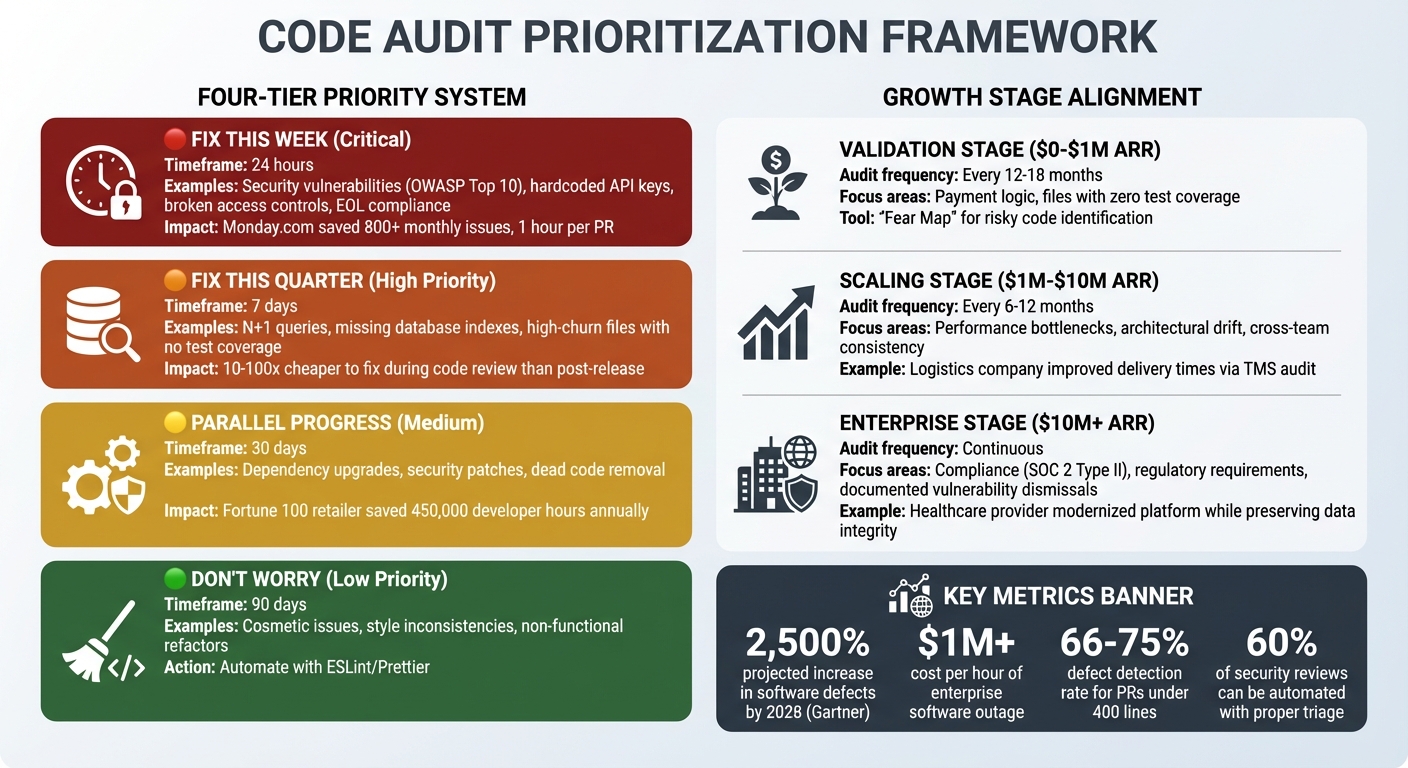
Code Audit Prioritization Framework: Fix Now vs Fix Later by Severity and Business Impact
Imagine completing a 48-hour audit of 100,000 lines of code and ending up with hundreds of findings. The big question is: what needs immediate attention, and what can wait?
Many teams fall into the trap of treating audit results as a simple checklist. They either try to fix everything at once – overloading the team – or set the report aside entirely. The smarter approach is to use a triage framework, turning findings into a prioritized roadmap that matches your business goals and technical resources.
What to Fix Now vs. What Can Wait
Not all findings are created equal. For example, a hardcoded API key in your payment system is a serious security risk, while a missing semicolon in an unused script is insignificant. To tackle this, group findings into four categories based on their severity and impact:
- Fix This Week (Critical): These are the "must-fix" items, like security vulnerabilities from the OWASP Top 10 (e.g., hardcoded keys, broken access controls). For instance, Monday.com avoided over 800 monthly issues by integrating security checks into their automated processes, saving about one hour of manual effort per pull request [5]. Compliance risks, such as outdated software versions, also fall into this bucket.
- Fix This Quarter (High Priority): These include architectural issues that, while not immediately catastrophic, can lead to higher costs or inefficiencies. Think N+1 queries, missing database indexes, or files with high churn but no test coverage. Fixing bugs early – during code review – can be 10 to 100 times cheaper than addressing them after release [21].
- Don’t Worry About It (Low Priority): Cosmetic or stylistic issues shouldn’t consume your team’s focus. Automate these with tools like ESLint or Prettier so you can concentrate on more impactful fixes.
- Parallel Progress Bucket: Handle tasks like dependency upgrades, security patches, and removing dead code alongside your ongoing sprints. For example, a Fortune 100 retailer saved 450,000 developer hours annually by centralizing code reviews across 2,500 repositories, enabling compliance teams to resolve audit questions in minutes [5].
"The thing that changed how I think about deliverables: I started asking myself, ‘if this team could only fix one thing this year, what should it be?’ It forces you to have an opinion, not just a list of observations. Clients hire you for the opinion."
- Piechowski.io [20]
To streamline decision-making and avoid unnecessary debates, label feedback clearly: BLOCKING (must fix), IMPORTANT (should fix), or OPTIONAL (suggestion) [5]. This structure ensures focus on what matters most.
Matching Fixes to Your Company’s Growth Stage
Your roadmap should evolve based on your company’s stage – whether you’re just starting out, scaling, or preparing for acquisition.
- Validation/Early Stage ($0–$1M ARR): At this stage, prioritize security and recoverability over perfection. Focus on critical areas like payment logic and files with zero test coverage. Using a "Fear Map" to identify risky parts of your codebase can help. Audits every 12–18 months are sufficient [20][22].
- Scaling Stage ($1M–$10M ARR): As your systems grow, architectural drift becomes a challenge. Address performance bottlenecks, like N+1 queries and database indexing issues, and ensure consistency across teams. For example, a logistics company improved delivery times by auditing its Transportation Management System to uncover outdated dependencies and performance issues. Audits at this stage should happen every 6–12 months [10][22].
- Exit-Readiness/Enterprise ($10M+ ARR): Compliance and regulatory requirements take center stage. Ensure every vulnerability dismissal is backed by solid reasoning to satisfy audits for certifications like SOC 2 Type II. For example, a healthcare education provider modernized its platform by addressing legacy code issues, preserving data integrity, and expanding functionality in line with revenue goals [10][13].
| Severity | Action Timeframe | Focus Area |
|---|---|---|
| 🔴 Critical | 24 hours | Security vulnerabilities, broken access controls, EOL compliance [20][5] |
| 🟠 High | 7 days | Architectural bottlenecks, high-churn/low-coverage files, N+1 queries [20][21] |
| 🟡 Medium | 30 days | Technical debt in non-critical paths, algorithmic optimizations [21] |
| 🟢 Low | 90 days | Non-functional refactors, automated style fixes [20][5] |
Incorporate these fixes into your sprint workflow by keeping pull requests small – ideally under 400 lines of code. Studies show that defect detection drops significantly for larger PRs (66–75% for 200–400 LOC) [2]. To maintain momentum, set clear SLAs for code reviews: 4 hours for urgent PRs and 24 hours for standard reviews [5]. This balance helps you move fast without sacrificing quality.
Conclusion
Reviewing 100,000 lines of code in just 48 hours isn’t about rushing through – it’s about having a smart, structured strategy. The difference between a chaotic audit and a productive one boils down to three main elements: preparation, prioritization, and selecting the right tools. These steps set the stage for everything that follows.
Start by ensuring you have access to the repository, infrastructure maps, and key documentation. Work with your tech leads to define focus areas, whether that’s security, performance, or scalability. Once the groundwork is laid, prioritize issues based on their business impact. Tackle core logic and security-critical paths first, leaving minor or cosmetic issues – those that automated tools can handle – for later. A hybrid approach is key: automated scans can catch straightforward problems like hardcoded credentials, while your team dives into more intricate architectural issues that require human insight. After priorities are clear, choosing the right tools becomes essential.
Picking the right tools can make or break your audit. Consumer-grade AI tools often fall short when dealing with enterprise-scale codebases, as they struggle with cross-service dependencies that could lead to outages. Instead, leverage purpose-built tools equipped with semantic dependency mapping to handle complex systems effectively [1][7]. And remember, every finding must include file:line evidence – without concrete proof, your remediation plan risks being built on shaky assumptions [4].
By following this approach, your audit becomes focused, actionable, and aligned with business goals. Skipping strategic planning could leave your organization vulnerable, especially with software defects projected to rise by 2,500% by 2028 [1]. Combining automated tools with manual expertise, demanding verifiable evidence, and organizing findings into a clear roadmap ensures that your team addresses what matters most – both technically and strategically.
Strategic planning turns an overwhelming pile of findings into a clear, prioritized roadmap. This not only prevents wasted effort but also ensures your team is fixing the issues that truly impact your business.
FAQs
What should we audit first in 48 hours?
Focus on the most pressing and high-risk areas when auditing. Start with internal controls, security weaknesses, and areas prone to significant errors or misstatements. Tackling these first ensures you address the most crucial issues within the 48-hour window while reducing potential risks effectively.
How do we stop AI tools from producing bad findings?
To make sure AI tools deliver reliable results, set up a solid validation framework that checks for accuracy, precision, and context-awareness. Pay close attention to minimizing false positives and negatives by continuously assessing performance and tweaking thresholds as needed.
It’s also smart to use a combination of tools to address potential blind spots. Back this up with human reviews to cross-check findings, and embed AI into a larger, principle-based review process. This approach helps boost reliability and keeps errors to a minimum.
How can we catch cross-repo breaking changes fast?
To spot cross-repo breaking changes efficiently, consider using AI-driven tools for dependency mapping and multi-repo analysis. These tools help uncover dependencies within extensive codebases, making it easier to identify areas where changes might introduce issues. By layering multiple AI-powered code review tools, you can improve accuracy by adding architectural context and addressing potential blind spots. This approach not only cuts down on manual effort but also ensures faster detection of problems across repositories.



Leave a Reply